> ## Documentation Index
> Fetch the complete documentation index at: https://www.voiceflow.com/docs/llms.txt
> Use this file to discover all available pages before exploring further.
# Variables
> Store and reuse context throughout a conversation.
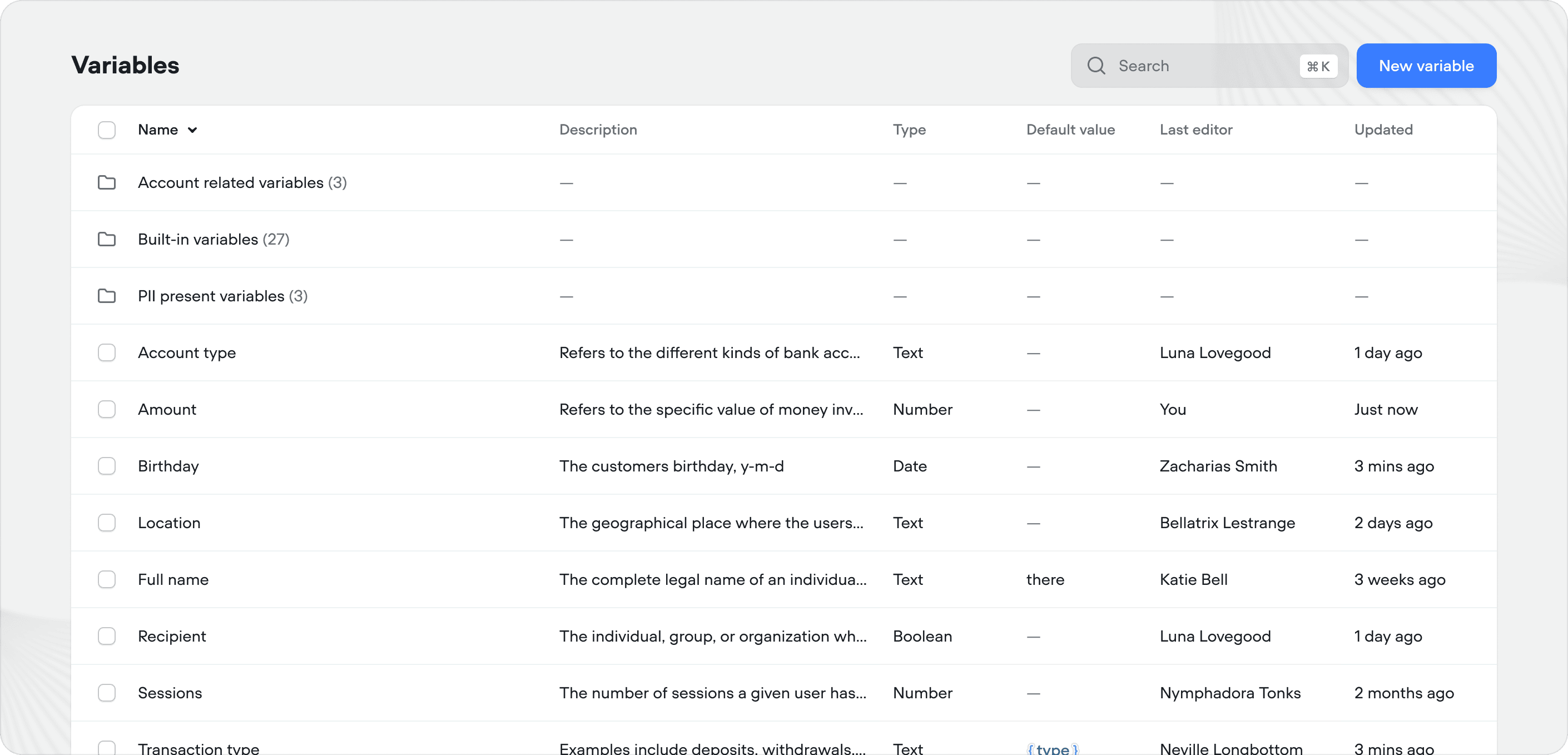 Variables let your agent remember and reuse information during a conversation - things like a user's name, account details, or selections they've made. They act as your agent's short-term memory, letting it personalize responses, make decisions, and pass data between steps.
Variables are scoped to individual users via `user_id`. If ten users are talking to your agent simultaneously, their variable values are completely independent.
## Creating variables
You can create a variable from anywhere your can insert them - type `{` in most text inputs across Voiceflow to see your existing variables or create a new one inline.
Variables let your agent remember and reuse information during a conversation - things like a user's name, account details, or selections they've made. They act as your agent's short-term memory, letting it personalize responses, make decisions, and pass data between steps.
Variables are scoped to individual users via `user_id`. If ten users are talking to your agent simultaneously, their variable values are completely independent.
## Creating variables
You can create a variable from anywhere your can insert them - type `{` in most text inputs across Voiceflow to see your existing variables or create a new one inline.
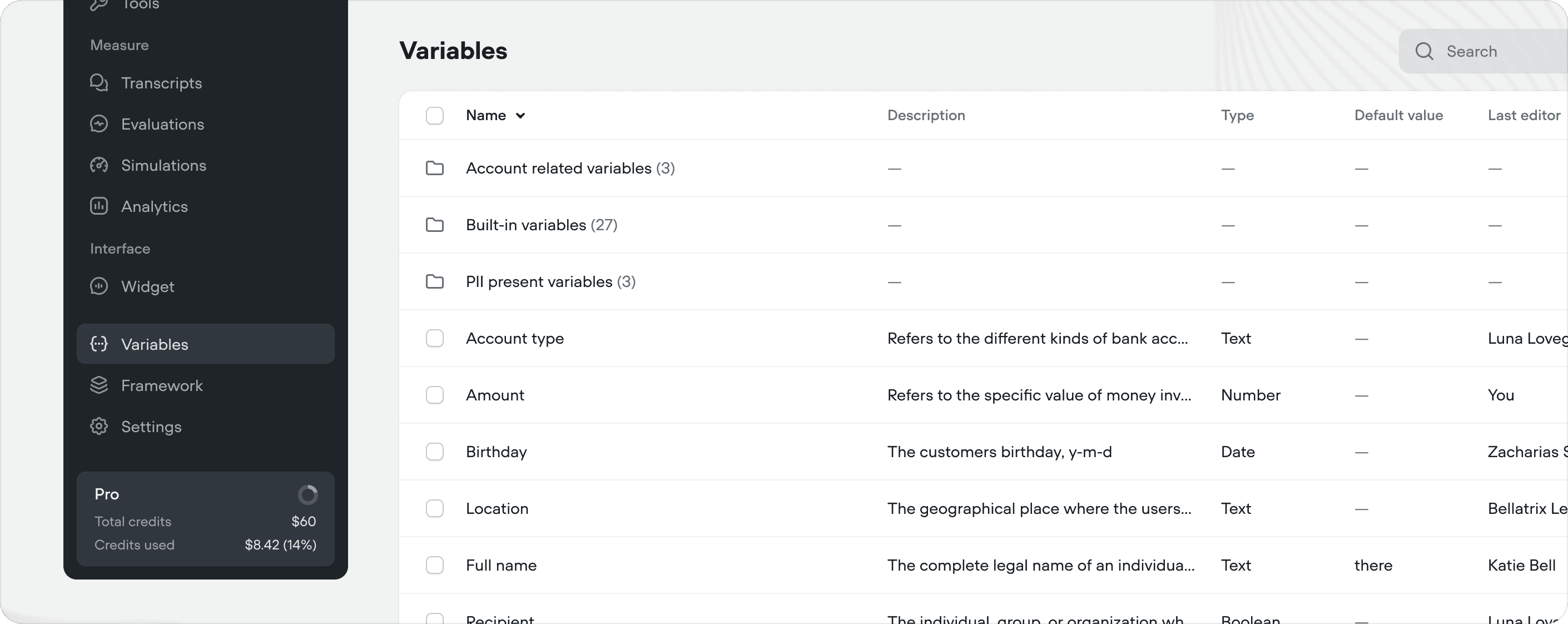
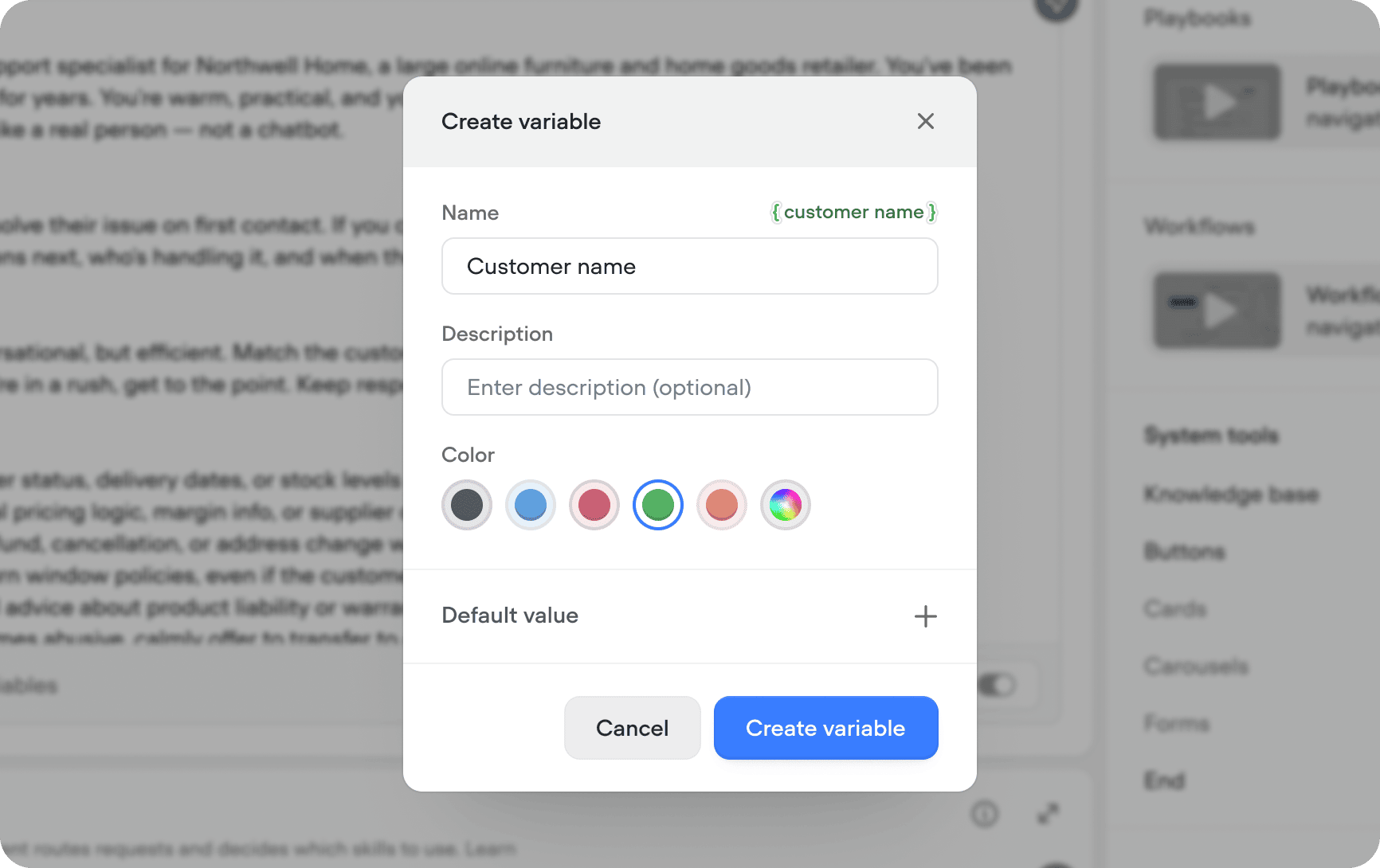 You can also manage variables from the **Variables** tab in the sidebar. Click **New variable** in the top right to create one, or click an existing variable to edit it. When creating a variable, you can optionally set a default value - this gives your agent a fallback if the variable hasn't been set yet during a conversation. By default, variables are initialized automatically and set to 0.
 ## Using variables
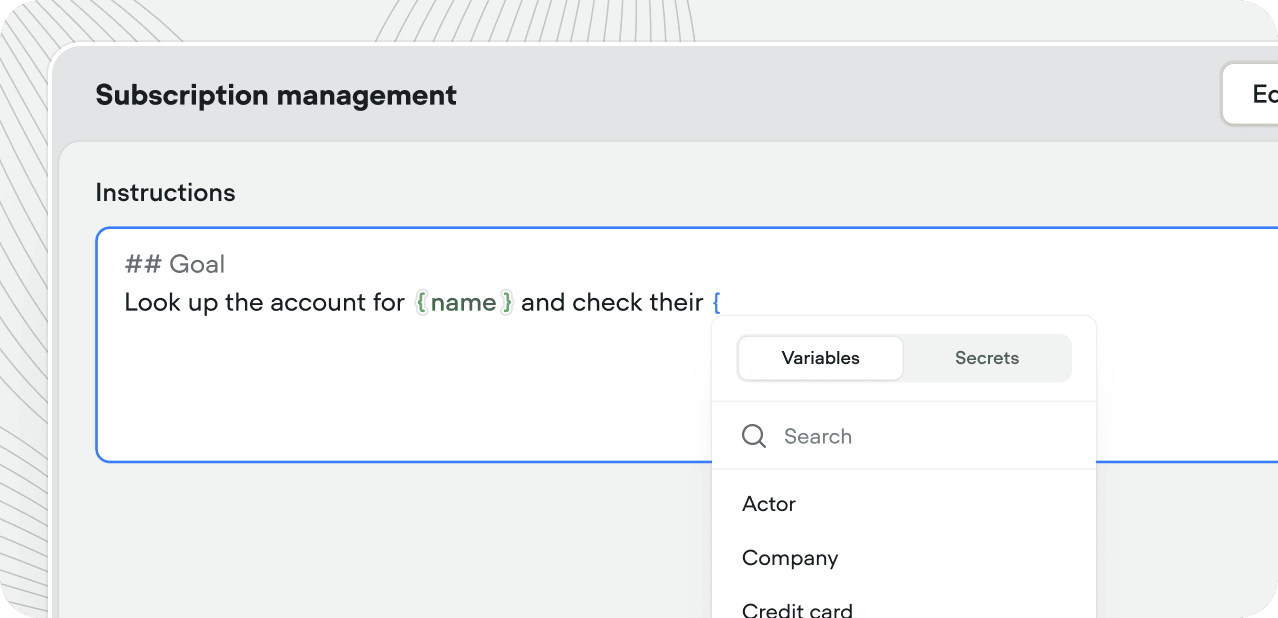
Reference a variable by typing `{` and selecting it from the searchable menu. Variables work inside playbook instructions, API tool URLs and headers, condition steps, response messages, and more. If you're in a place where you need to use a variable, type `{` and it the menu will pop up.
Inside agent and playbook instructions, typing `/` inserts a [reference](/docs/documentation/build/editor/references) to a tool, playbook, or workflow the same way.
## Using variables
Reference a variable by typing `{` and selecting it from the searchable menu. Variables work inside playbook instructions, API tool URLs and headers, condition steps, response messages, and more. If you're in a place where you need to use a variable, type `{` and it the menu will pop up.
Inside agent and playbook instructions, typing `/` inserts a [reference](/docs/documentation/build/editor/references) to a tool, playbook, or workflow the same way.
 ## Setting variable values
| Method | How it works |
| ------------------------------------------------ | ---------------------------------------------------------------------------------------------------------------------------------------------------------------------------------------------------------------------------------------------- |
| [**Set step**](/docs/documentation/build/steps/set) | Assign a value directly in a workflow |
| [**Code step**](/docs/documentation/build/steps/code) | Set values using JavaScript logic |
| **Tool responses** | Capture the response from an [API tool](/docs/documentation/build/tools/api-tool) or [function](/docs/documentation/build/tools/function-tool) and store it in a variable |
| **Playbook exit conditions** | Variables attached as [exit conditions](/docs/documentation/build/playbooks) on a playbook are filled by the agent during the conversation, then passed back when the playbook completes via a [playbook step](/docs/documentation/build/steps/playbook) |
## Persisting variables across sessions
When you create or edit a variable, you can choose whether its value persists across sessions for the same user. This lets you decide, per variable, whether your agent remembers a value when someone returns and starts a new session with the same `user_id`, or starts fresh each time.
To set this, open the **Variables** tab in the sidebar, create or select a variable, and switch **Persist across sessions** on or off.
* **On**: the variable keeps its value when the same user starts a new session, so your agent can pick up where it left off (eg: greeting a returning customer by name or remembering their plan tier).
* **Off**: the variable resets to its default value at the start of each new session, so it only lasts for the duration of a single session.
Turn this off for values that should only apply to the current session, such as a one-time verification code, a temporary selection, or the user's progress through a flow. Keep it on for long-lived details you want your agent to remember across visits, like a user's name or their preferences.
## Built-in variables
Every project has access to built-in variables that are automatically set when a conversation begins or when certain events occur.
| Variable | Description | Example |
| ------------------ | --------------------------------------------------------------------------------------------------------------------------------------------------------------------------------------------------------------------------------------------------------------- | ------------------------------------------------------------------ |
| `user_id` | The user's unique ID, set via the [chat widget](/docs/documentation/deploy/widget/embedding-the-chat-widget) or [API](/docs/api-reference/api-overview). For [phone](/docs/documentation/deploy/phone/connect-a-phone-number) integrations, this is the caller's phone number. | `example_user` or `+16471234567` |
| `last_utterance` | The previous message sent by the user | `My name is Braden and I like cookies.` |
| `last_response` | The agent's most recent response | `Hello, I'm an agent! How can I help today?` |
| `last_event` | The last [event](/docs/documentation/build/behaviour) the user triggered (object, not string) | `{"type":"event","payload":{"event":{"name":"buySyrup"}}}` |
| `vf_memory` | The last ten user inputs and agent responses as a string, including tool calls | `agent: Hey what's up?`
## Setting variable values
| Method | How it works |
| ------------------------------------------------ | ---------------------------------------------------------------------------------------------------------------------------------------------------------------------------------------------------------------------------------------------- |
| [**Set step**](/docs/documentation/build/steps/set) | Assign a value directly in a workflow |
| [**Code step**](/docs/documentation/build/steps/code) | Set values using JavaScript logic |
| **Tool responses** | Capture the response from an [API tool](/docs/documentation/build/tools/api-tool) or [function](/docs/documentation/build/tools/function-tool) and store it in a variable |
| **Playbook exit conditions** | Variables attached as [exit conditions](/docs/documentation/build/playbooks) on a playbook are filled by the agent during the conversation, then passed back when the playbook completes via a [playbook step](/docs/documentation/build/steps/playbook) |
## Persisting variables across sessions
When you create or edit a variable, you can choose whether its value persists across sessions for the same user. This lets you decide, per variable, whether your agent remembers a value when someone returns and starts a new session with the same `user_id`, or starts fresh each time.
To set this, open the **Variables** tab in the sidebar, create or select a variable, and switch **Persist across sessions** on or off.
* **On**: the variable keeps its value when the same user starts a new session, so your agent can pick up where it left off (eg: greeting a returning customer by name or remembering their plan tier).
* **Off**: the variable resets to its default value at the start of each new session, so it only lasts for the duration of a single session.
Turn this off for values that should only apply to the current session, such as a one-time verification code, a temporary selection, or the user's progress through a flow. Keep it on for long-lived details you want your agent to remember across visits, like a user's name or their preferences.
## Built-in variables
Every project has access to built-in variables that are automatically set when a conversation begins or when certain events occur.
| Variable | Description | Example |
| ------------------ | --------------------------------------------------------------------------------------------------------------------------------------------------------------------------------------------------------------------------------------------------------------- | ------------------------------------------------------------------ |
| `user_id` | The user's unique ID, set via the [chat widget](/docs/documentation/deploy/widget/embedding-the-chat-widget) or [API](/docs/api-reference/api-overview). For [phone](/docs/documentation/deploy/phone/connect-a-phone-number) integrations, this is the caller's phone number. | `example_user` or `+16471234567` |
| `last_utterance` | The previous message sent by the user | `My name is Braden and I like cookies.` |
| `last_response` | The agent's most recent response | `Hello, I'm an agent! How can I help today?` |
| `last_event` | The last [event](/docs/documentation/build/behaviour) the user triggered (object, not string) | `{"type":"event","payload":{"event":{"name":"buySyrup"}}}` |
| `vf_memory` | The last ten user inputs and agent responses as a string, including tool calls | `agent: Hey what's up?`
`nuser: I want to order maple syrup.` |
| `vf_now` | Current date and time. Timezone configurable in **Settings** → **General** | `Monday, Jan 1, 2025, 16:37` |
| `vf_date` | Current date | `Jan 1, 2025` |
| `vf_time` | Current time | `16:37` |
| `vf_month` | Current month | `January` |
| `vf_day` | Current day of the month | `1` |
| `vf_year` | Current year | `2025` |
| `vf_user_timezone` | The user's timezone. Defaults to project timezone if unavailable | `America/Toronto` |
| `sessions` | Number of times this user has opened the agent | `8` |
| `timestamp` | [UNIX timestamp](https://en.wikipedia.org/wiki/Unix_time) of when the conversation began | `873700668` |
| `vf_transcript_id` | The unique ID of the current conversation's [transcript](/docs/documentation/measure/transcripts). Can be passed to the [Get transcript](/docs/api-reference/transcript/get-transcript) API to retrieve the full conversation history. | `65f2a1b8c9d4e5f6a7b8c9d0` |
| `locale` | The user's [locale](https://learn.microsoft.com/en-us/globalization/locale/standard-locale-names), detected from their browser | `en-CA` |
| `platform` | The platform your agent is running on | `voiceflow` |