> ## Documentation Index
> Fetch the complete documentation index at: https://www.voiceflow.com/docs/llms.txt
> Use this file to discover all available pages before exploring further.
# SMS
> Receive text messages on a Twilio number and route them to your agent automatically.
Once a Twilio phone number is [connected to your project](/docs/documentation/deploy/phone/connect-a-phone-number), incoming text messages are automatically routed to your agent.
Inbound SMS is the channel: people text your number and your agent replies. To send an SMS from a chat or voice conversation, use the [Twilio tool](/docs/documentation/build/tools/twilio-tool).
## How it works
When someone texts your connected phone number, Voiceflow routes the message based on how the number is configured for SMS:
* **Assigned to an environment:** every message goes to that environment, using either its **Published** (live) version or its **Draft**, depending on which you picked when assigning.
* **Unassigned:** messages follow the [traffic split](/docs/documentation/deploy/environments/traffic-split) configured in **Settings** → **Environments**, just like chat sessions, phone calls, and API conversations.
SMS assignment is independent of [voice assignment](/docs/documentation/deploy/phone/connect-a-phone-number#routing-calls-to-an-environment). A number can route calls to one environment and texts to another.
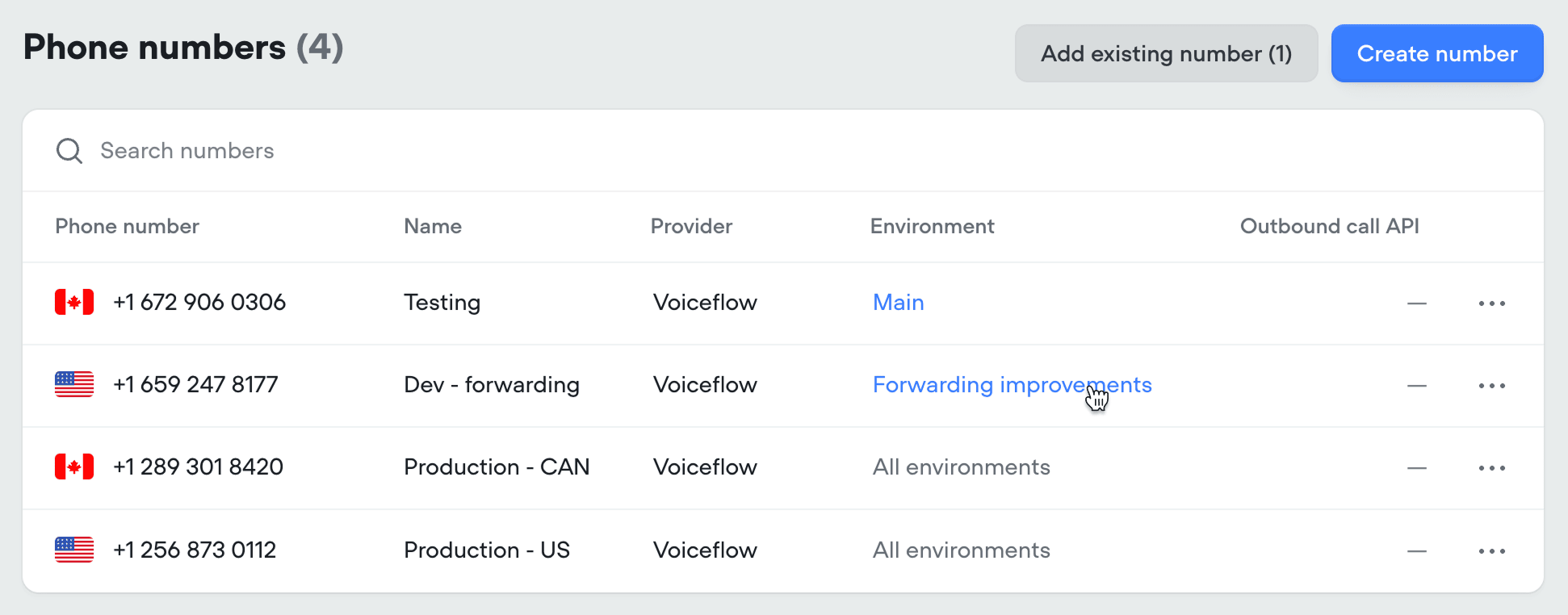
To change a number's SMS assignment, click the environment label next to the number in the **Phone numbers** tab. See [Routing SMS to an environment](/docs/documentation/deploy/phone/connect-a-phone-number#routing-sms-to-an-environment) for the full flow.
 ## Sender identification
When a text comes in, the sender's phone number is automatically set as the `user_id` [variable](/docs/documentation/build/data/variables). This lets you identify returning users and personalize conversations based on their information.
## Testing draft changes by SMS
While you're working on a change, point a non-production phone number at the environment's **draft version**. Texts to that number use your unpublished work, so you can message in and verify the change yourself before publishing. A phone number that real users text should never be pointed at a draft.
## Testing changes with real users
When you want to validate a change against `Main` using real message data, use a [traffic split](/docs/documentation/deploy/environments/traffic-split). Clone `Main`, make and publish your change in the new environment, then route a small percentage of SMS traffic to it. Compare the results in [Analytics](/docs/documentation/measure/analytics) and [Transcripts](/docs/documentation/measure/transcripts), and once you're confident, [merge the environment](/docs/documentation/deploy/environments/merging) back into `Main`.
## Sender identification
When a text comes in, the sender's phone number is automatically set as the `user_id` [variable](/docs/documentation/build/data/variables). This lets you identify returning users and personalize conversations based on their information.
## Testing draft changes by SMS
While you're working on a change, point a non-production phone number at the environment's **draft version**. Texts to that number use your unpublished work, so you can message in and verify the change yourself before publishing. A phone number that real users text should never be pointed at a draft.
## Testing changes with real users
When you want to validate a change against `Main` using real message data, use a [traffic split](/docs/documentation/deploy/environments/traffic-split). Clone `Main`, make and publish your change in the new environment, then route a small percentage of SMS traffic to it. Compare the results in [Analytics](/docs/documentation/measure/analytics) and [Transcripts](/docs/documentation/measure/transcripts), and once you're confident, [merge the environment](/docs/documentation/deploy/environments/merging) back into `Main`.