

If your AI project feels like building an Iron Man suit out of scraps—you’re not alone. Right now, everyone wants teams to spin AI miracles out of dust and dreams. But we can’t all be Tony Stark, the genius AI wizard.
Thankfully, most AI teams aren’t trapped in the desert attempting to create customer support chatbots with rusty metal. But with budget constraints, the risks of deploying large language models (LLMs), and the technical burden on your stack, producing AI agents can feel like you’re fighting for everything you need to succeed.
So let’s take a step back and analyze the costs of building, deploying, and expanding effective AI agents. This will not be a listicle on the costs of each line item—although, if you’d like to see something like that, let me know. Instead, we’ll be talking about how to approach strategizing and budgeting the time and resources necessary to build a sustainable AI operation.
We’ll explore the strategy and costs associated with scaling agents across new use cases, how to weigh the cost of tools and technology like GPUs, choosing the right models (and why you might be choosing wrong), and how to budget for innovation and experimentation.
If you’re more of an audio-visual learner, we suggest tuning into our webinar on this topic (featuring Colin Guilfoyle, VP for Customer Support at Trilogy, who managed to automate over 60% of their customer support in under two months). Stick around for the full breakdown below.
ROI for Your AI: Budgeting, Costing, and Measuring AI Automation
Starting small before scaling agents and use cases
Starting with a simple agent is the surefire way to gain traction, before scaling to numerous agents and use cases. Because when you try to walk before you crawl or run before you walk, you’re going to trip over your own feet.
Starting a new AI agent? [We’ve got you]
But running before you walk isn’t as common an issue for most teams. Most companies struggle to move their first AI proof of concept (POC) out of production purgatory—it’s often called the cold start problem, named for the difficulty in starting old internal combustion engines when the gas is cold. Once the gas is hot, turning the engine on and off is a breeze. Similarly, once teams have launched one AI agent, they find it much faster and easier to expand to several agents or several use cases.
But you don’t have to take my word for it. Colin Guilfoyle, VP for Customer Support at Trilogy, has done it. His team started with one AI build—they call it the Atlas core, very Tony Stark-coded—and have used that build to expand to 90 customer support lines that handle AI support across products.
In order to scale production to this level and keep all their agents working smoothly once they got there, they needed to start with how they organized their team. Because there’s so many product lines that require support, their team is made up of code-focused, senior product specialists. These directly responsible individuals (DRIs) are given a subset of products to analyze each week, including how well the customer support automations and tickets are performing. Then, they replicate what goes right and refine what goes wrong—from refining knowledge base searches, training models, ticket raising, building the right retrieval-augmented generation (RAG), and integrating the right tools to solve specific product issues. They apply their best practices to their Atlas core, which they use as a foundation for building and expanding to new agents and products, and the process continues.
By effectively dividing and replicating their agents, while continually monitoring and improving them, Trilogy is on track to support 65% of their customer inquiries using AI agents. The next phase of their expansion includes replacing human support on L2 troubleshooting and automating customer changes in the system securely.
[Read more about how Trilogy automated 60% of their customer support in 12 weeks.]
While you may not have the budget to expand your team or want to create 90 agents, Trilogy’s approach to iterative improvement and replication is a wise one to consider when weighing costs. When it comes to scaling your agent, whether that’s launching more agents or expanding your agent’s current capabilities, there’s a lot you can do. Start with your minimal viable product (aka your single use case AI agent) and slowly layer in the use cases that expand its problem-solving. You’ll know it’s time to add new use cases when you’ve mastered the one you’re currently on. In fact, you’ll find the cost of ownership remains quite sustainable if you’ve built processes and integrated tools that are growing according to your needs.
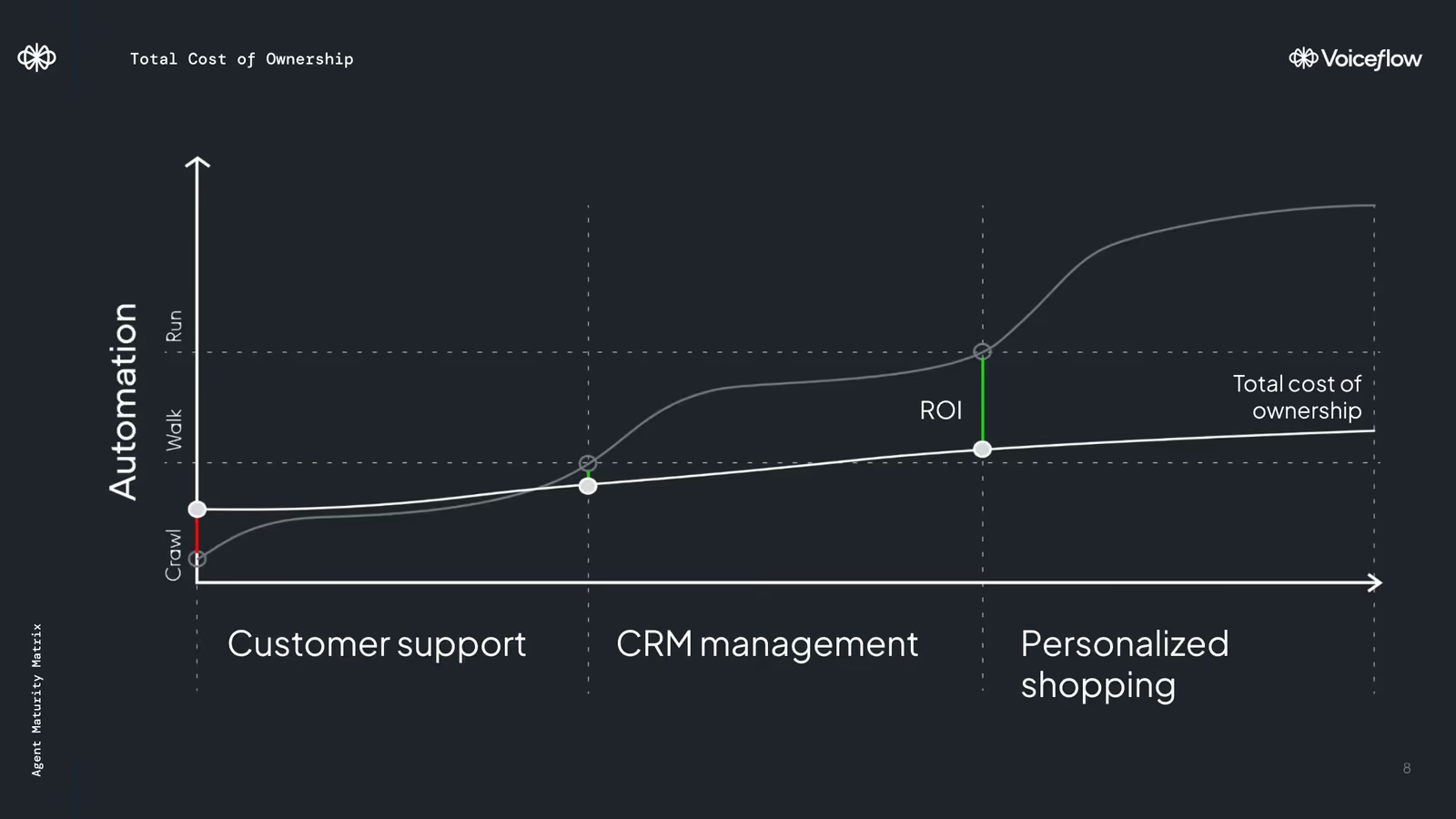
As you scale, you’ll experience savings costs when it comes to human support hours. Trilogy reduced their human support hours by 60% after 12 weeks, freeing support staff to focus their efforts more efficiently. In the long run, scaling sustainably allows your support needs to grow as you do while saving your team the one resource they can’t get back—time.
“How much should I budget for this?”
People always ask me this question. And the answer is an unsatisfactory one—it depends. In the case of Trilogy, a large-scale enterprise that streamlines operations and support for hundreds of clients, they use a variety of tools ranging in cost, including:
- Amazon Web Services: For compute, hosting, backups, etc. They also use Lambas, the first port of call for tickets, which categorizes the issue and offers a response based on a knowledge base
- LLMs: some text
- OpenAI, to generate responses
- Enki, to cross-check LLM responses and choose the best one. If there isn’t a viable answer, Enki kicks the response back up a step to generate a better one
- Anthropic
- Occasionally, Gemini
- Zendesk: for managing and routing tickets
- Voiceflow: to design, produce, and launch AI agents
Large companies with AI support across channels can spend over $100,000 on LLMs, tokens, and associated AI costs. Similarly, it can cost up to the same per year on Amazon Web Services. And that doesn’t include the cost of engineering a sophisticated support system that automatically generates and cross-checks AI responses across 90 agents.
When you’re talking about tooling, people, and time, it’s hard to make estimates about how much you should spend on AI agents unless we talk through the minute details of your circumstances. (Shameless plug for my colleague Peter Isaacs, who would be stoked to talk through your AI automation journey in painstaking detail.)
My advice is to talk to your technology and tooling vendors, ask colleagues in your field, and do a lot of research. We’ve also included a RAG cost estimation template for you to forecast costs for your next project.
5 tips for choosing your LLM models (spoiler: versions are underrated)
The number of LLMs available has exploded in the last year. The influx of choices brings questions about which ones you should be using based on your use cases. There are five things you can do right now to understand models and choose the right ones.
- Rely on RAG: Build a robust knowledge base and use RAG to pull that information into your LLM when it’s generating responses. This enhances the effectiveness of your LLM by providing useful context for your responses from your datasets, documentation, and FAQs. Don’t underestimate how powerful RAG can be. The more context your AI agent has, the fewer LLM calls it needs to generate a relevant response, the more cost-effective your agent can be.
- Model versions matter: Many people complain about OpenAI’s GPT, claiming that it’s getting worse with each new version—but it’s unlikely OpenAI is releasing worse versions of their flagship product. What’s happening is that the newest version no longer works for your particular use case. Don’t trust the AI leaderboard. Spend time on prompt engineering. Do multiple tests before you land on the model and version for your use case. For many projects, using an older LLM version will offer results on par with the newest version and be more budget-friendly.
- Use models to cross-check responses: As previously mentioned, Trilogy layers their LLMs atop one another. This tiered approach would begin with your agent using an NLU to match your user's response to an intent you’ve already mapped, like collecting account information or surfacing a help link. If your agent can’t find a match, it moves down the order priority and uses RAG to search your knowledge base and find sections of documents you’ve uploaded that have the closest semantic similarity. If it finds a match, it’ll use your LLM to generate an answer to address your user’s intent. Then cross-check that response with a different LLM, generating two responses and choosing the best one. This process has multiple benefits, including better quality control, more accurate AI responses, reduction in hallucinations, more concise responses, and improved data collection.
- Test different models for different use cases: Using a tiered approach can also help you test which models work best for your use cases. If you find that one model consistently “wins” at the quality control cross-check, it might be worth investing in that LLM over the other. For classification tasks, some use cases are better suited to GPT-4, but Haiku, one of the cheapest models, also performs well and should not be discounted. The newest version of Claude may not work as well for your support tasks as the previous one. The key is to test, evaluate, and iterate as you work with different models and versions.
- Weigh the cost of prompt engineering vs. upgrading your model: This is where teams need to make decisions on accuracy, development costs, and runtime costs. You can put a massive context window into GPT-4 or Claude Sonnet 3.5 and you'd be spending a couple of dollars per interaction. You could also use smaller models but you’d need a way to measure the tradeoff—the cost of running the model compared to the business gains of increased latency. This is where having good evaluations is important. Improving the prompts also takes time for both the prompt engineering and surrounding systems. You have to make a large number of LLM calls to actually see a return on investment. You have to weigh how much time that prompt engineering and evaluation is worth. You might increase your LLM costs by upgrading your LLM, but that might be worth it if you’ve already optimized your prompts.
Choosing the right LLMs requires thoughtful intention. Use RAG to provide context, making whichever LLM you choose more efficient and cost-effective. Different model versions work better for different tasks, so don’t be afraid to use older versions and cross-check responses to ensure quality and accuracy. You should be balancing the costs of prompt engineering against your models to help you achieve the best performance within your budget.
To GPU or not to GPU? That is the question.
A graphics processing unit (or GPU) has made the modern world of AI possible. Compared to CPUs, GPUs have many smaller processing cores designed to work in parallel. As a result, LLMs and other Gen AI models use GPUs to perform massive mathematical and operational tasks quickly and simultaneously. Today, enterprise, consumer-grade GPUs serve multiple uses, from model building and low-level testing to deep learning operations, like biometric recognition.
We won’t go into all of the GPUs out there, because there are a bunch. But they are typically divided into three categories useful for enterprise:
- Consumer-grade GPUs: Typically sold for gaming, but have been used for local model training and deployment, particularly open source models.
- Cloud-based GPUs: Many cloud providers let you rent GPUs ranging from entry-level (T4s) to state-of-the-art clusters (H100s). A great place to get started when experimenting, training, or running models.
- Datacenter GPU clusters: For larger companies, procuring your own GPU cluster or server becomes an option. These can be just the hardware installed in a data center or platform offering to get started faster.
The question is, do you need one? GPUs are expensive resources. For many, using proprietary models and a serverless approach gets them far enough in their AI journey to solve for most use cases. But for the folks interested in AI innovation and playing with bigger, faster, complex AI projects, a GPU has been a critical asset, leading to some supply challenges.
Choosing the right hardware for a use case is essential. It’s overkill to build a cluster of H100 GPUs to run a seven billion model inference. It takes a lot of engineering hours to host a model, optimize inference, batch queries, and put up guardrails to make it run efficiently. Instead of investing in a GPU—and spending months installing and deploying models-—my advice is to leave it to platforms until use cases and costs are better defined. When you’re building a large-scale AI operation, hiring a team to run innovation makes sense. But for most use cases, avoid the complexity and use CPUs and smaller models more often. Bigger isn’t always better.
Add research, eval-driven development, and experimentation to your budget
The conversation around AI seems to center around avoiding risk and not getting left behind. It’s a pretty negative approach to an exciting and novel technology, and that affects how we evaluate the value of AI and budget for it. But a budget represents more than just money, it represents time, effort, and strategic thinking. Instead of thinking about all the ways things can go wrong, invite your teams (and even your leaders) to budget for:
- Keeping up with AI: Budget the time necessary for your team to understand the AI landscape. Colin’s team at Trilogy spends two hours a week on Twitter, LinkedIn, and Reddit, learning, engaging with new information, and expanding their AI knowledge. Because of this, they’re proactive about addressing new use cases and experimenting with tools. When executives come to them with requests, they’re ready to respond, either with a plan to adopt new ideas or an explanation of their previous experiments. Budgeting time for AI makes their team more productive, knowledgeable, and adaptable to change.
- Evaluation-driven development: AI projects aren’t always clear on returns, but that hasn’t stopped every company under the sun from adopting some form of AI technology. So, if we’ve already accepted that, it would serve us to evaluate the ROI of AI accordingly. Budget your engineering prowess behind evaluation-driven development (EDD), a methodology for guiding the development of LLM-backed projects using a set of task-specific evaluations, like expected prompts, contexts, and outputs as references. These evaluations guide prompt engineering, model selection, and fine-tuning to help you quickly measure improvements or regressions as your project changes. Don’t just measure how many tickets you automate. Determine what parameters you’d evaluate success in, and work backwards.
- Experimentation and known problems: Finally, you need a budget to experiment and roll out new tools, tech, and use cases. There needs to be support from leadership for this. AI moves quickly and if your AI team is keeping up with the changes, they’ll also need a budget to experiment and react to those changes. On the other hand, don’t let shiny new tools and ideas have you too focused on problems under the streetlight instead of known issues AI could solve.
It’s not too late to invest in the time, evaluation, and experimentation you need to succeed with AI. The most important problems aren’t the easiest ones to solve, but an organization that is forward-thinking about AI will see ROI faster than a reactive one.
Let’s build Iron Man-level AI on a start-up budget
Remember, you don't need to be Tony Stark to achieve results with AI. By starting small and scaling up, carefully budgeting for tools and technology, and prioritizing continuous learning and experimentation, you can make the most of your budget, no matter the size.