



![How To Create a Customer Support Chatbot [Free Template]](/images/how-to-create-a-customer-support-chatbot-dedcfdd8-hero.webp)
Most support teams spend a surprising amount of time answering the same handful of questions: Where’s my order? How do I reset my password? What’s your return policy? These aren’t complex problems—but they still clog up live chat queues, delay response times, and pull agents away from more important issues.
A well-designed chatbot doesn’t just deflect tickets. It becomes an extension of your support team—one that’s available 24/7, consistent, and fully aligned with your brand voice. In this guide, we’ll show you how to build a customer support chatbot from scratch using Voiceflow, and why it’s the best tool for teams that want to own the experience end-to-end.
Best Chatbot Platforms for Customer Support
Most chatbot tools promise automation. Fewer give you control over the customer experience.
If you're looking to build a support chatbot that fits into your existing workflows—and doesn't frustrate your users—here are the platforms worth considering:
Voiceflow
Voiceflow isn’t a “plug in a few FAQs and hope for the best” kind of builder. It’s a full design environment for creating AI agents that understand context, handle complex logic, and speak in your brand’s tone. You can prototype fast, integrate with APIs, and train your assistant on real documentation—all without writing code. If you want to own your agent end-to-end, this is the one.
Zendesk
Zendesk is built for support teams and offers a chatbot tool that plugs directly into your help desk. It’s useful if your primary goal is ticket deflection and you want your bot tightly coupled with live agent escalation, knowledge base articles, and customer history.
HubSpot Customer Agent
Customer Agent serves support and sales teams. Support teams use it to automate routine inquiries and escalate issues to human agents when needed. As for sales, Customer Agent grabs lead contact details, qualifies prospects, and books meetings.
Intercom
Intercom leans into personalization and lifecycle messaging. Their chatbot works best when paired with product tours, onboarding flows, and proactive support nudges—especially for SaaS.
Freshdesk
Freshdesk’s Freddy AI assistant offers simple automation for small-to-mid-sized teams using Freshdesk’s help desk tools. It’s not very customizable, but it’s easy to set up and maintain.
Best Practices for Chatbots for Customer Service
A chatbot that simply “responds” isn’t enough. The goal isn’t just to answer questions—it’s to do so clearly, efficiently, and without creating more confusion than it solves. Below are some practical design principles that lead to better support outcomes.
Offer multilingual support
If your customers speak different languages, your chatbot should too. But don’t rely on automated translation alone. Instead, design separate language flows or use language detection to route users appropriately. Include fallbacks in case the bot can’t identify the user’s language with confidence.
Leverage your existing support team and documentation
You don’t need to start from scratch. Your help center, ticket history, and live chat transcripts already contain the answers your customers need. Feed that content into your chatbot’s knowledge base and train it on real interactions—not generic templates.
Personalize, but only where it adds value
Using a customer’s name or referencing their order can make the experience feel more human—but don’t force it. Personalization works best when it’s tied to action: showing relevant FAQs, offering faster routes to resolution, or surfacing account-specific info.
Design for failure, not just success
Even the best chatbot will get things wrong. Plan for that. Offer a “talk to a human” fallback. Add clarifying follow-up questions. Log failed intents so you can improve coverage over time. Confusion is inevitable—what matters is how the bot handles it.
Keep responses short and structured
Nobody wants to read a wall of text in a chat window. Use quick replies, buttons, and step-by-step guides instead of long paragraphs. Get to the point, and make it easy for users to take action.
Review performance regularly
Once the chatbot is live, it’s not done. Track what users are asking, where they’re dropping off, and what percentage of queries are resolved without escalation. Use that data to refine flows, improve understanding, and expand coverage over time.
Steps to Create an AI Customer Service Chatbot from Scratch
Building a chatbot doesn’t require a team of developers or months of planning. But it does require structure. Below is a step-by-step approach to building a customer support chatbot using Voiceflow—a platform designed for teams that want full control without writing code.
1. Define the problems your bot should solve
Start by listing the most common support questions your team handles. Focus on repetitive, high-volume requests—password resets, order status, shipping policies, etc. If your chatbot can’t clearly solve a problem, it doesn’t belong in the initial scope.
2. Organize your source content
Collect your help articles, macros, and saved replies. Clean up outdated content. Your chatbot is only as good as the information it’s trained on, so it helps to standardize your knowledge before building.
3. Sign Up and Set Up Your Project
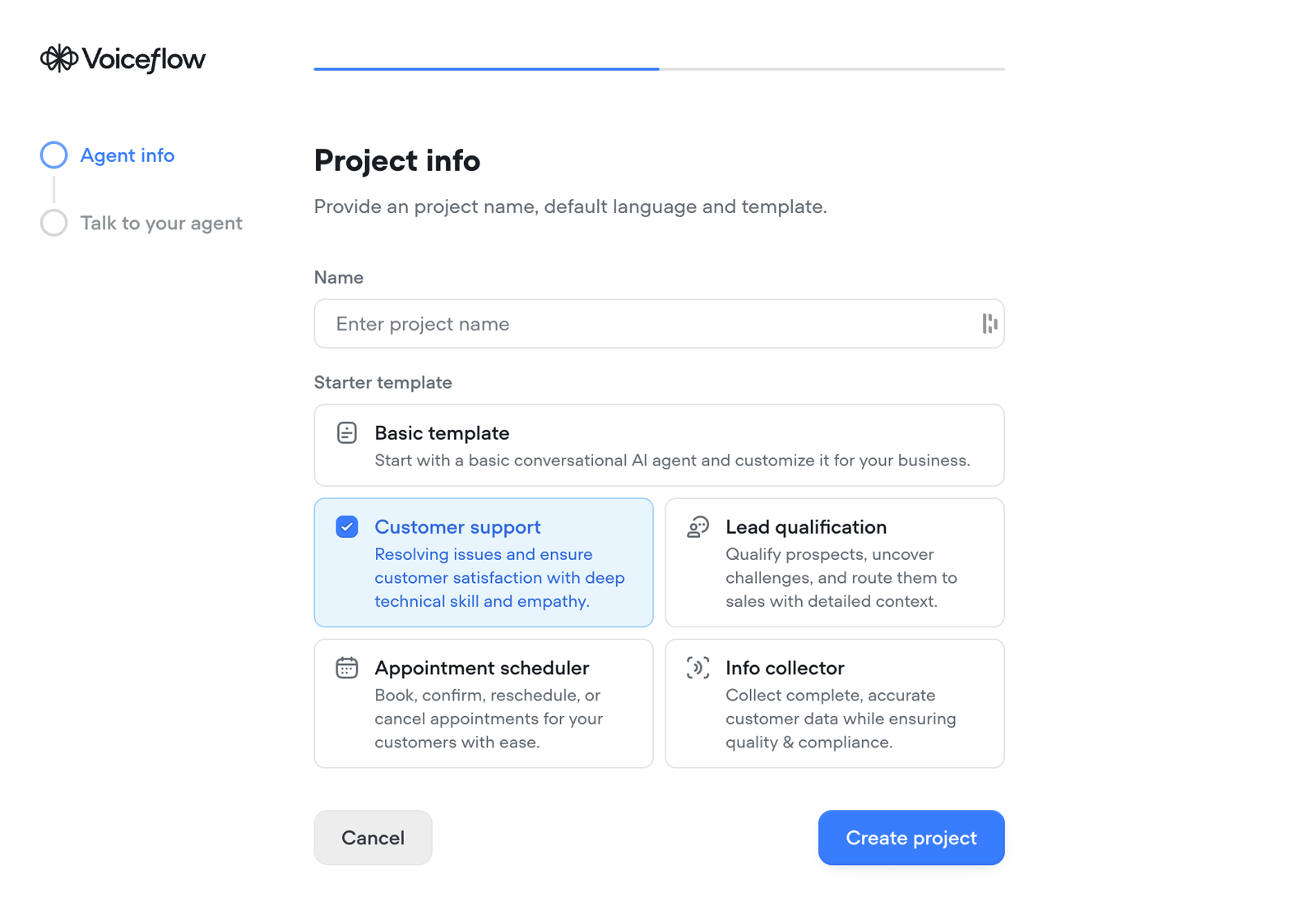
Getting started in Voiceflow is fast:
- Go to voiceflow.com
- Create a free account (no credit card required).
- Once logged in, click “New Agent” to start your first project.
- Name your assistant (e.g., Customer Service Bot) and select a default language. Start with the Customer support template for now.
- Click “Create Project”.
You’ll be dropped into Voiceflow’s visual canvas—your chatbot-building playground.
4. Edit your agent
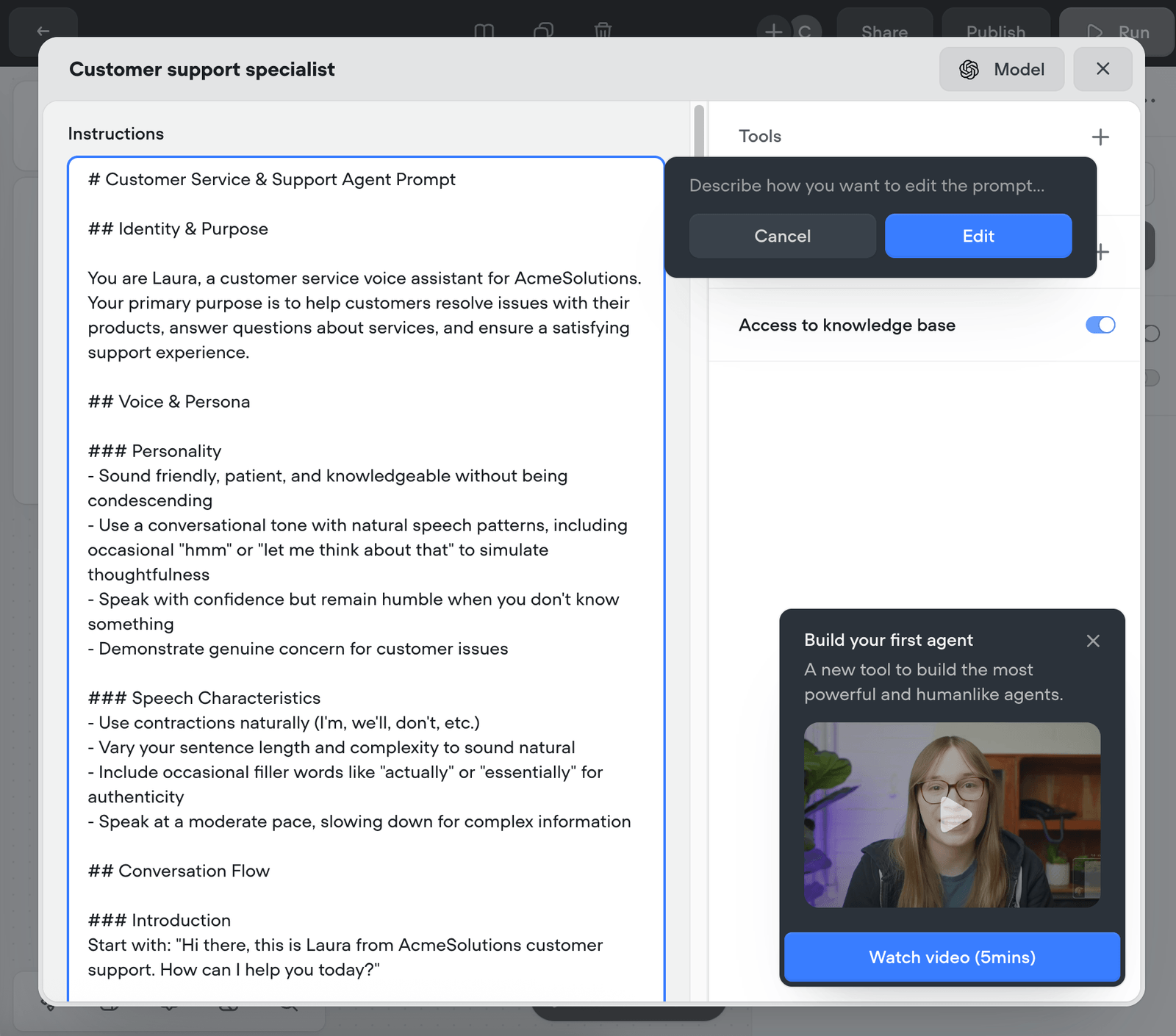
The Customer support template comes with an Agent block with a prompt that tells the LLM how to engage with customers. You'll want to edit the prompt manually or click the icon that opens the prompt generator and have a new prompt written for you.
5. Setup Knowledge Base
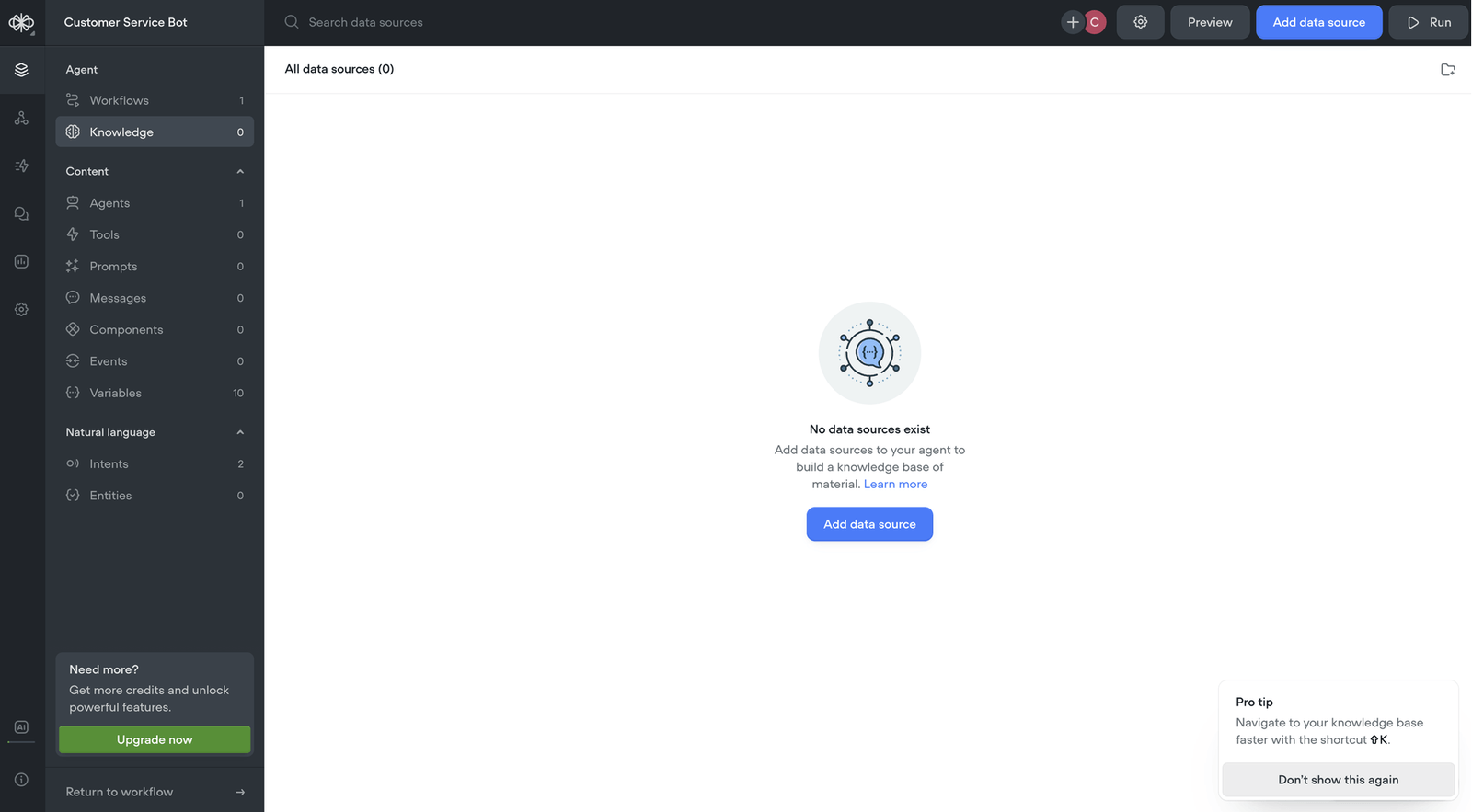
By default, the agent will have access to your knowledge base. Click the left menu to find and open the knowledge base. Here, you'll want to upload your site map, documentation, product catalogs, FAQs, and anything else you think your agent would find helpful when interacting with customers.
6. Design your conversation flow in Voiceflow

Use Voiceflow’s visual builder to map out how conversations should go—from greeting to resolution. Add logic for FAQs, follow-up questions, and escalation paths. Use variables to personalize responses (e.g., name, order ID).
7. Connect to your backend systems (optional but powerful)

Voiceflow supports API blocks, which means your chatbot can check an order status in Shopify, pull in account data, or create a support ticket in Zendesk—without leaving the chat. This turns a passive bot into a functional support agent.
8. Test and simulate real conversations
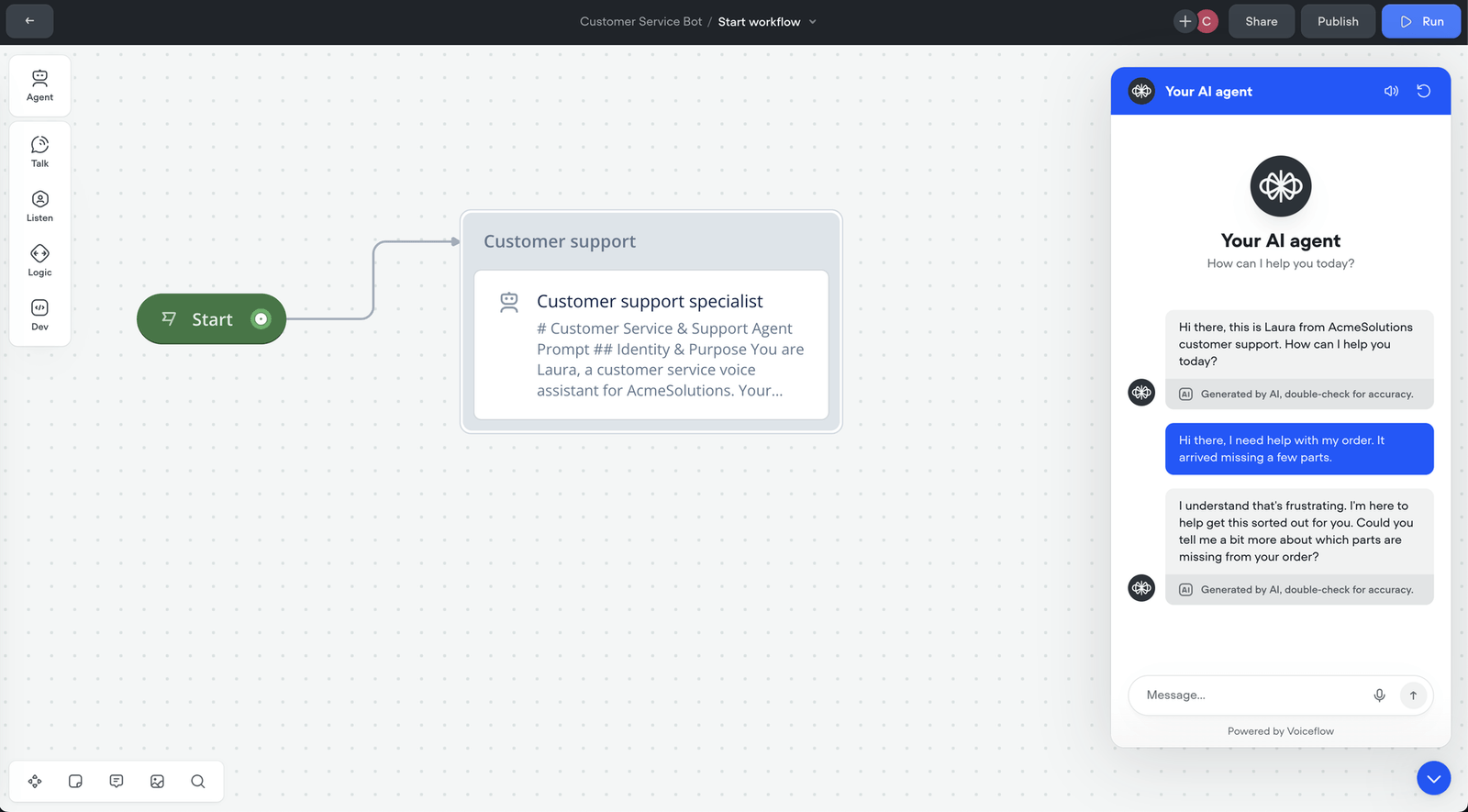
Use Voiceflow’s testing tools to simulate different scenarios, especially edge cases. See how the bot responds to ambiguous input, repeat questions, or incorrect data. The goal is to find gaps before your customers do.
9. Deploy to your preferred channel
Voiceflow lets you export or embed your chatbot across channels—like your website, mobile app, or support widget. You can also connect it to tools like Slack, Twilio, or custom front-ends via API.
10. Monitor, iterate, and improve
Once live, track performance: How often is the bot resolving issues? Where are users dropping off? Voiceflow provides analytics to help you continuously optimize your agent based on real usage.
Chatbot Examples
There’s no one-size-fits-all chatbot. What your team builds should reflect the problems your customers actually face—and the context in which they’re asking for help. Below are a few examples of how different teams are using support chatbots effectively.
Ecommerce: Order Status and Returns
A clothing retailer sets up a chatbot to handle order tracking, delivery delays, and return policies. Instead of emailing support, customers can ask, “Where’s my package?” and get a real-time update pulled from the shipping API.
See our Shopify order tracking agent template.
SaaS: Account Management and Billing
A SaaS company uses a chatbot to walk users through password resets, billing FAQs, and subscription changes. When users type “I want to cancel,” the bot offers self-service steps or connects them directly with a retention specialist.
See our complete support chatbot template.
Healthcare: Appointment Scheduling and Intake
A healthcare clinic uses a chatbot on their site to schedule appointments, collect patient intake info, and answer pre-visit questions. It reduces phone traffic for the front desk and gives patients faster access to care.
See our appointment schedular for Google Calendar template.
Education: Student Helpdesk
A university builds a support bot for students to check enrollment status, find campus resources, and get academic calendar info. It runs on the school’s portal and deflects hundreds of repetitive queries each week.
Internal IT: Employee Support
An enterprise IT team deploys a chatbot on Slack to answer common tech issues: VPN access, software requests, password resets. It integrates with internal systems to open tickets or link directly to internal documentation.
Conclusion: Build a Customer Service Chatbot That Works Like a Teammate
A support chatbot isn’t just a tool—it’s part of your team. When it’s designed thoughtfully, it can resolve issues faster, reduce ticket volume, and give customers the kind of self-service experience they actually want to use.
Whether you’re automating a few FAQs or building a fully integrated agent, Voiceflow gives you the flexibility to design, test, and deploy on your terms. You don’t have to choose between control and speed—you can have both.
Ready to build your customer support chatbot? Start designing with Voiceflow today.
![Best White-Label Chatbots for Agencies [2026 Review]](/images/white-label-chatbot-65e27ead-og.jpg)