A few years ago I built an AI knowledge base the hard way. I scraped our docs, ran them through OpenAI embeddings, stuffed the vectors into a local database, and wired up a retrieval chain in LangChain so a Voiceflow assistant could answer questions from them. It worked, and I learned exactly which parts of that stack actually matter.
Most teams don't need to build any of that by hand anymore. But you still need to understand what's happening under the hood, because that's what decides whether your knowledge base gives customers a real answer or a confident wrong one.
What Is an AI Knowledge Base?
A knowledge base is a centralized, searchable library of content built to answer questions about a specific topic. There are two kinds, and the difference matters.
A traditional knowledge base is human-readable: blog articles, FAQs, step-by-step guides. It's good for SEO, because search engines can index and rank the content. But it's a static handbook. Your customer still has to read through it to find the one answer they came for.
An AI knowledge base is machine-readable. Instead of making the customer search, an AI agent reads the question, finds the relevant content for them, and answers in plain language. Same source material, completely different experience: the customer asks "how do I change my password?" and gets the answer, not a list of articles that might contain it.
How an AI Knowledge Base Actually Works
Strip away the marketing and an AI knowledge base is retrieval-augmented generation, or RAG. It runs in four steps, and the quality lives in the middle two.
Chunking. Your documents get split into small, self-contained pieces. A "Returns Policy" page becomes a handful of chunks, each a few sentences long. Chunk too big and retrieval gets noisy; too small and it loses context. This is the step people underestimate.
Embedding. Each chunk is converted into a vector, a list of numbers that captures its meaning. Similar ideas land near each other in that vector space, which is how the system matches "I want my money back" to your refund chunk even though the words don't overlap. This is semantic search: matching on meaning, not keywords.
Retrieval. When a customer asks something, their question gets embedded too, and the system pulls the chunks closest to it in vector space. Get this right and the model has the facts it needs. Get it wrong and everything downstream falls apart.
Generation. The retrieved chunks, the customer's question, and your instructions go to a language model, which writes the answer. Because the model is answering from your content instead of its training data, this is also the most reliable way to reduce hallucinations: the facts are grounded in what you uploaded.
Older "AI knowledge bases" leaned on hand-tuned intent models and entity tags. In 2026 it's an LLM reasoning over retrieved context, which is why these systems handle off-script, badly phrased questions far better than keyword search ever did.
The Voiceflow Knowledge Base, End to End
The Voiceflow Knowledge Base is a clean way to see the whole RAG loop without building it yourself.
You add data sources: upload documents, point it at URLs, or paste content directly. Voiceflow chunks and embeds them for you, so there's no vector database to stand up or maintain. In the visual builder, a Knowledge Base Query step retrieves the relevant chunks for whatever the user just asked, then hands them to the model along with your custom instructions. Those instructions act as the wrapper prompt that shapes tone and guardrails, which is really an exercise in conversation design.
You pick the model that writes the answer, and you're not locked to one vendor: swap between OpenAI, Anthropic, or Google when cost or quality changes. That's the same architecture I hand-built in 2023, minus the part where I maintained the embeddings pipeline myself.
What an AI Knowledge Base Is Good For
Pairing an AI knowledge base with an agent pays off in three ways, and they compound.
Deflection. Routine questions ("where's my order," "how do I reset this") get answered instantly, around the clock, without a human. That's the core of automating tier-1 support tickets. It's also why an AI customer service agent frees your team for the messy, high-judgment cases. Just measure deflection honestly, since a deflected ticket isn't the same as a solved problem.
Consistency. Every answer comes from the same approved source. No more one rep quoting an old policy and another quoting the new one. Update the document, and the agent's answers update with it.
Scale. Question volume grows with the business. A knowledge-base-backed agent absorbs that growth without you hiring and training proportionally, which is the practical version of doing more with the same team.
Build It Yourself or Use a Managed Platform?
You have two real paths, and the honest answer is that most teams should not hand-build.
Build it yourself. Wire up the stack directly: a framework like LangChain or LlamaIndex to load and chunk documents, an embedding model, a vector database for storage and search, and a retrieval chain that feeds the model. This is what I did in 2023, and it's the right call when you need control you genuinely can't get elsewhere: a custom retrieval strategy, an unusual data source, or tight integration with your own backend. The cost is that you now own and maintain all of it. To go this route, start with how to train an AI agent on custom data, and treat your wrapper prompt as a first-class part of the system, not an afterthought.
Use a managed platform. It handles chunking, embeddings, and retrieval, and you focus on the content and the conversation. You get to a working agent in an afternoon instead of a sprint, and there's no pipeline to babysit. This is where most customer-facing knowledge bases should live, and it's how you'd build a customer support chatbot without a backend team.
A useful rule: build it yourself only if the thing you'd build differs from the platform version in a way your users would actually notice. Most of the time, it won't.
The Best AI Knowledge Base Tools in 2026
There's no single "best" tool, because the category splits by job. Here's how the main options compare, and who each one is for.
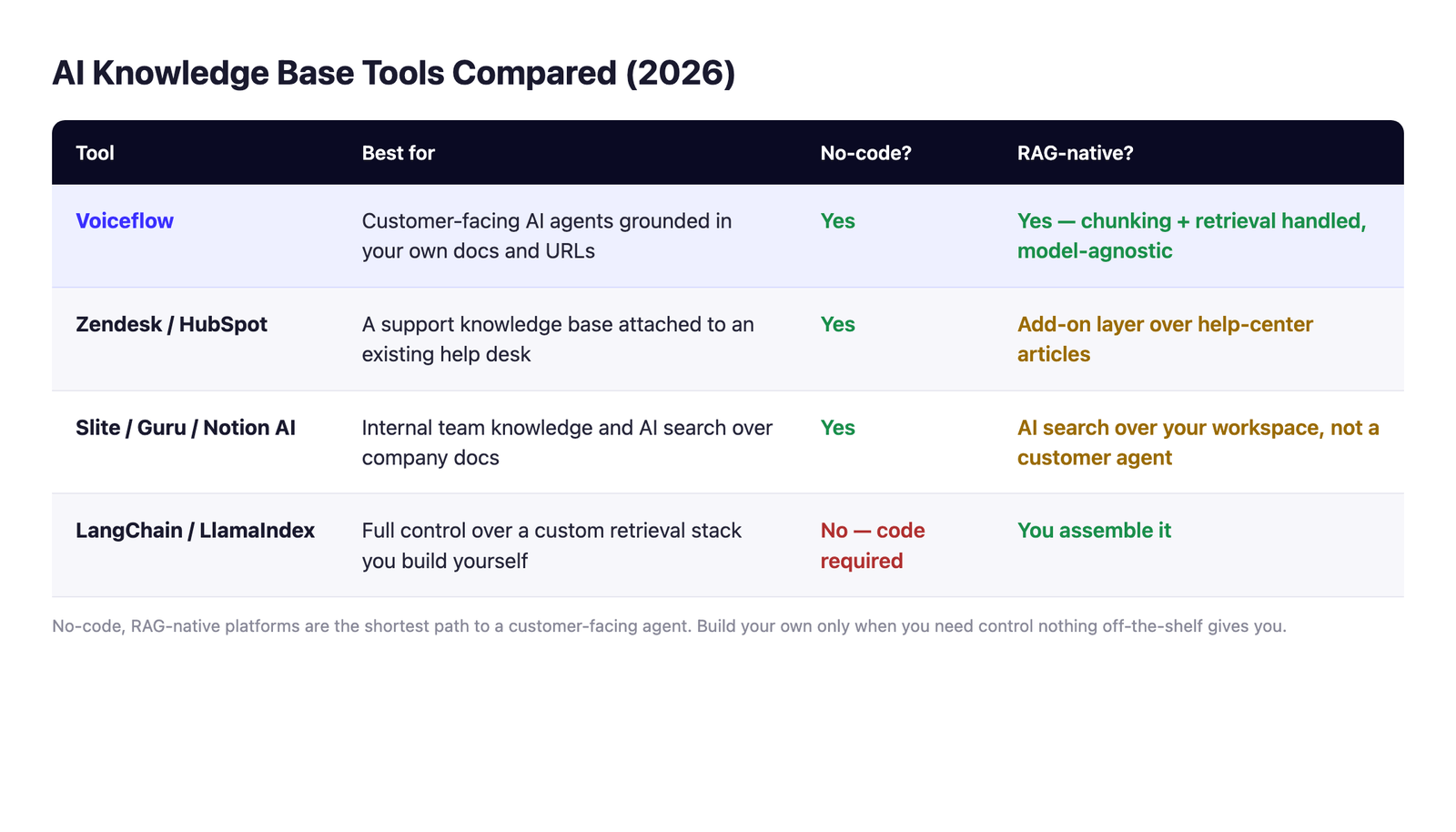
If your goal is an agent that answers customers from your content, a RAG-native agent platform is the shortest path. If you mainly need your own team to find internal docs faster, a workspace tool fits. If you need control nothing off-the-shelf gives you, build it.
One caveat for older lists: Microsoft retired QnA Maker in 2025, so any "best free knowledge base" roundup that still recommends it is out of date. Its replacement now lives inside Azure AI Language as custom question answering.