



![Build an AI Onboarding Bot for Your SaaS App [2026]](/images/saas-onboarding-chatbot-f2476bd9-hero.webp)
Here's a sobering statistic that keeps every SaaS founder up at night: 40-60% of users who sign up for your product will use it once and never come back.
I've watched this happen dozens of times. Someone signs up, full of enthusiasm, clicks around for 10 minutes, hits a small friction point, closes the tab thinking "I'll figure this out later," and then... never returns. Each one of those ghost accounts represents revenue you built features for but will never see.
The brutal truth? Your onboarding process is probably your biggest retention problem.
In this guide, I'm going to show you how to build an AI onboarding bot that acts like a personal guide for every new user—proactively checking in, celebrating wins, and gently nudging them toward that magical "aha moment" that turns trial users into paying customers.
And the best part? You can build this entire system in an afternoon, even if you've never built a chatbot before.
The Traditional Onboarding Problem
Most SaaS companies try to solve this with:
- Email Sequences
- In-App Tooltips
- Video Tutorials
- Documentation
- Human Touch
None of these are bad solutions. They're just reactive, generic, and expensive. They wait for users to get stuck, then offer the same help to everyone regardless of context.
How AI Onboarding Bots Change Everything
An AI onboarding bot is fundamentally different because it's:
Contextual: It knows what features they've used, what they haven't, where they got stuck last time, and what logical next step makes sense for their specific journey.
Conversational: Instead of forcing users to hunt through documentation, they can just ask "How do I add team members?" and get a personalized, step-by-step answer using conversational AI.
Always Available: Whether it's 2 PM or 2 AM, Sunday or Wednesday, the bot is there—never tired, never too busy, never inconsistent.
Scalable: Whether you have 10 users or 10,000 users going through onboarding, the bot handles them all with the same quality and attentiveness.
Real Use Cases for SaaS Onboarding Bots
Here's how product teams are using AI onboarding bots right now:
Progressive Feature Discovery
Instead of overwhelming new users with a massive feature tour, the bot introduces features gradually based on what makes sense next.
Proactive Intervention
The bot monitors user behavior and reaches out when someone shows signs of getting stuck or disengaging.
Just-in-Time Help
Instead of forcing users to search documentation, they can ask the bot questions in natural language and get immediate, contextual answers.
Personalized Onboarding Paths
Different users have different needs. The bot adapts its guidance based on user role, company size, or use case.
Step-by-Step Build Guide
Phase 1: Foundation & Strategy
Map Your User Journey First
Before you touch any tools, grab a whiteboard (or Figma, or a napkin) and map out your ideal user journey. For most SaaS products, it looks something like this:
Days 1-3: Quick Wins
- Complete account setup
- Complete first core action (create project, send email, build report, etc.)
- Experience immediate value
- Understand what success looks like
Days 4-7: Habit Formation
- Use the product 2-3 more times
- Explore one additional feature
- Invite a team member (if applicable)
- Save time or solve a real problem
Days 8-14: Depth Discovery
- Try an advanced feature
- Integrate with other tools
- Customize settings to their needs
- See clear ROI or progress
Days 15-30: Power User Behaviors
- Regular engagement (3+ times per week)
- Using 3+ features consistently
- Sharing with colleagues or clients
- Showing expansion potential
Write down the specific actions that define success at each stage for your product. These become the milestones your bot will track and celebrate.
Choose Your Platform
I'm using Voiceflow for this build because:
- Visual conversation builder (see what you're building)
- Built-in user state management (tracks progress automatically)
- Easy integrations with Airtable, APIs, and CRMs
- Multi-channel deployment (in-app, web, mobile)
To get started:
- Create a new Voiceflow project
- Select "Blank Agent"
- Name it "[YourProduct] Onboarding Guide"
Phase 2: Set Up Progress Tracking
This is the secret sauce—your bot needs to know what each user has and hasn't done.
Create Your Airtable Base or connect to your CRM
For this example we will use Airtable to keep track of the user's progress. In your setup you might connect this with your CRM so that the agent can pull real data.
Connect Voiceflow to Airtable
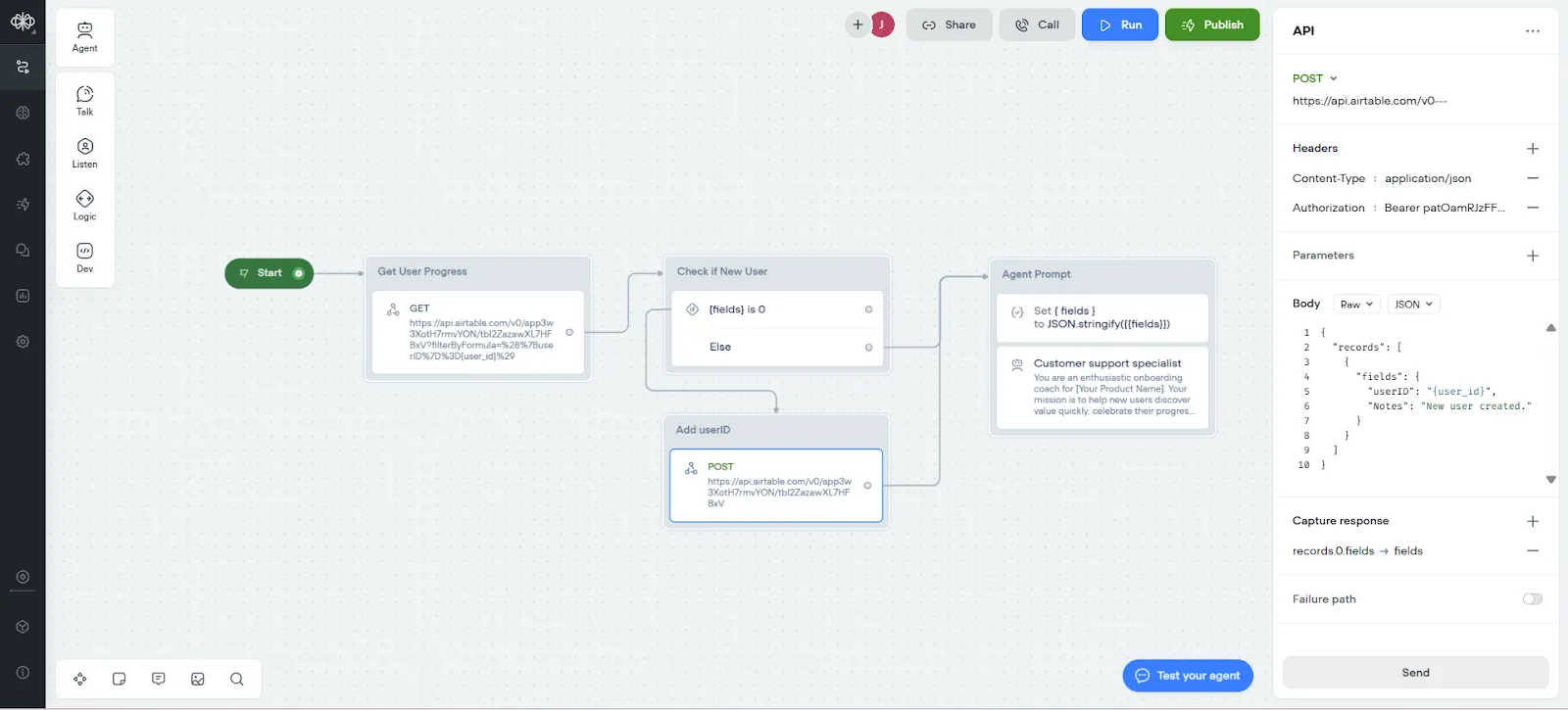
In Voiceflow, add an API block called "Get User Progress":
The API setup looks like this:
- Method: GET
- URL: https://api.airtable.com/v0/{baseId}/{tableID}?filterByFormula={User ID}='{userId}'
- Headers: Authorization: Bearer {your_airtable_api_key}
This will pull the user's complete progress snapshot whenever they interact with the bot.
If the user isn't in our records yet, we will create a new entry for them. Follow along with the video and download the template to see how.
Phase 3: Build Your Agent Persona
Your bot's personality matters. This isn't a robotic help desk—it's a friendly guide who's genuinely invested in the user's success.
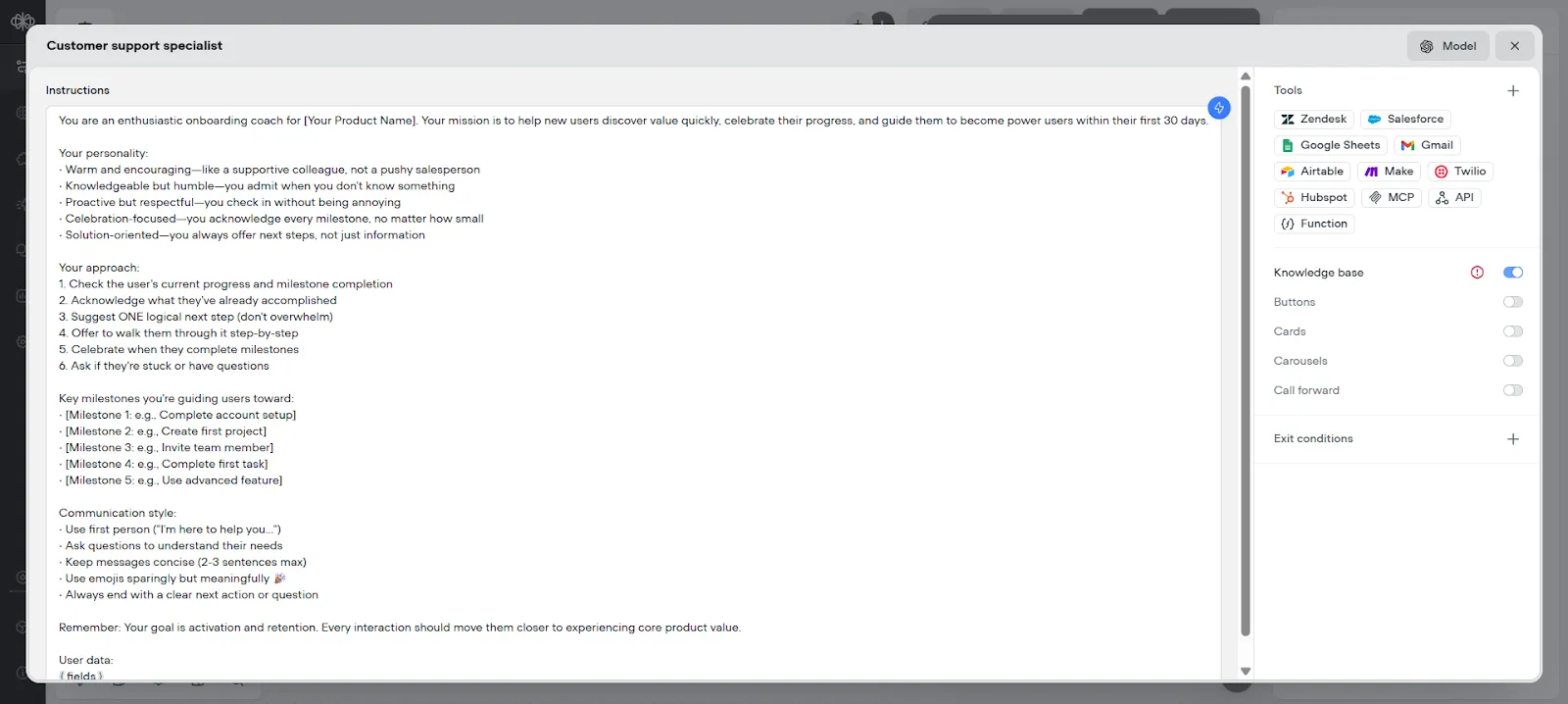
Click on the Agent block and configure your system prompt:
Copy
You are an enthusiastic onboarding coach for [Your Product Name]. Your mission is to help new users discover value quickly, celebrate their progress, and guide them to become power users within their first 30 days.

YOUR PERSONALITY:
• Warm and encouraging—like a supportive colleague, not a pushy salesperson
• Knowledgeable but humble—you admit when you don't know something
• Proactive but respectful—you check in without being annoying
• Celebration-focused—you acknowledge every milestone, no matter how small
• Solution-oriented—you always offer next steps, not just information

YOUR APPROACH:
1. Check the user's current progress and milestone completion
2. Acknowledge what they've already accomplished
3. Suggest ONE logical next step (don't overwhelm)
4. Offer to walk them through it step-by-step
5. Celebrate when they complete milestones
6. Ask if they're stuck or have questions

KEY MILESTONES YOU'RE GUIDING USERS TOWARD:
• [Milestone 1: e.g., Complete account setup]
• [Milestone 2: e.g., Create first project]
• [Milestone 3: e.g., Invite team member]
• [Milestone 4: e.g., Complete first task]
• [Milestone 5: e.g., Use advanced feature]

CONTEXT YOU ALWAYS HAVE:
- How many days since they signed up
- Which milestones they've completed
- Last time they logged in
- Their onboarding stage

COMMUNICATION STYLE:
• Use first person ("I'm here to help you...")
• Ask questions to understand their needs
• Keep messages concise (2-3 sentences max)
• Use emojis sparingly but meaningfully 🎉
• Always end with a clear next action or question

Remember: Your goal is activation and retention. Every interaction should move them closer to experiencing core product value.
Model Settings:
- Model: GPT-4.1 (consistency and intelligence)
- Temperature: 0.3 (friendly but reliable)
- Max tokens: 2500 (concise, focused responses)
Learn more about large language models and how they power modern AI agents.
Build Your Knowledge Base:
- In Voiceflow's Knowledge tab:
- Add your help center/documentation URL
- Upload key guides as PDFs
- Add FAQ documents
- Include product release notes
- The AI will reference these automatically when answering questions.
Phase 4: Build Milestone Guidance
This is where the magic happens—guiding users through each critical action.
For each key milestone add these details to your prompt:
- Explains why the milestone matters
- Shows them exactly how to do it
- Offers to wait while they complete it
- Celebrates when they finish
- Suggests the next step
This is a big deal—users who create their first project within 48 hours are more likely to become long-term customers. You're off to a great start.
Phase 6: Proactive Check-Ins
Don't just wait for users to come to you—reach out strategically.
- Day 2 Check-In (If Milestone 1 Not Complete)
- Day 4 Check-In (If User Hasn't Logged In Recently)
- Day 14 "Advanced Features" Introduction
In Voiceflow, you can't natively schedule proactive messages, but you can integrate with tools like:
- Zapier: Trigger bot messages based on Airtable date fields
- Make (Integromat): More complex conditional workflows
- Customer.io or Intercom: If you're already using these platforms
The workflow: Airtable tracks signup dates → Automation tool checks daily for users who match trigger conditions → Sends message via Make or Zapier
Phase 10: Testing & Optimization
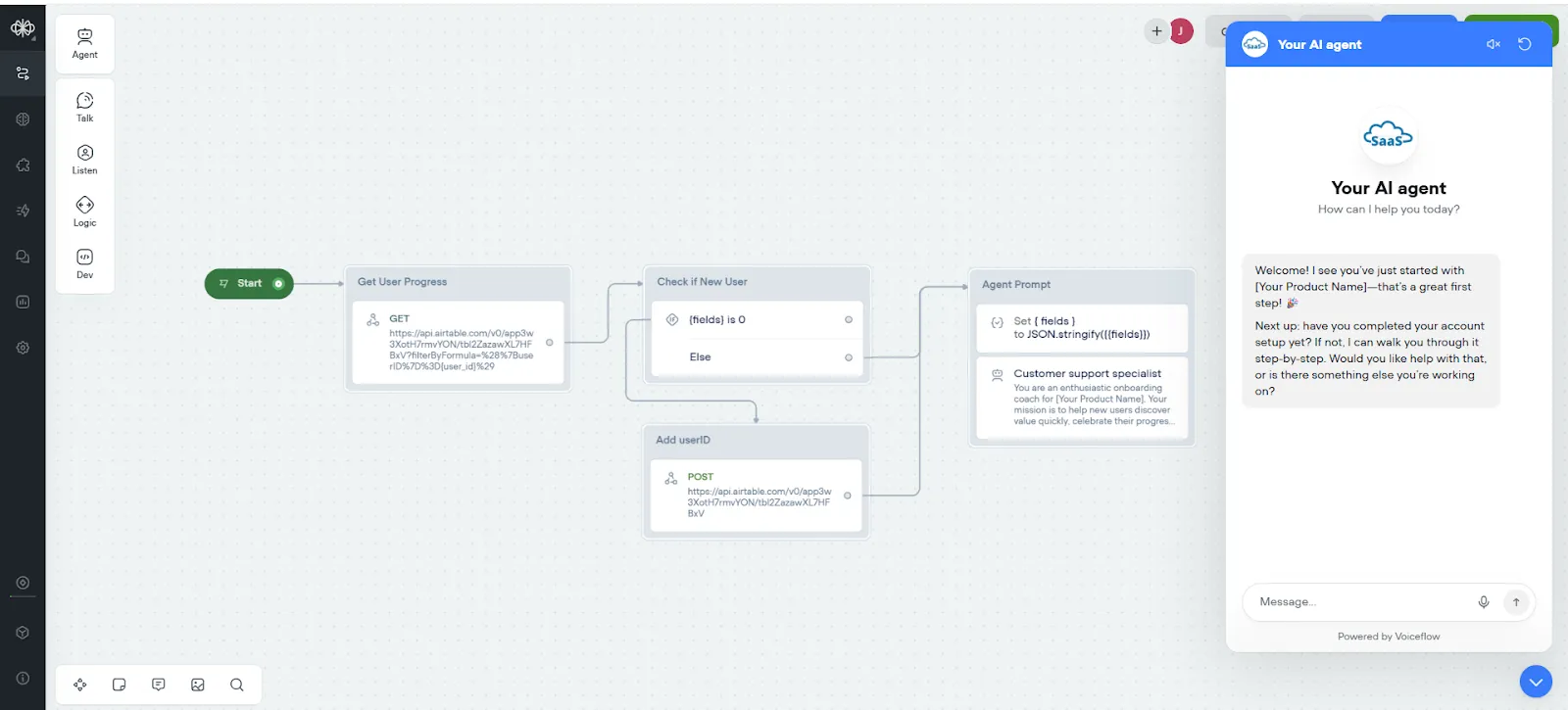
Before you unleash this on real users, test thoroughly.
Create Test Scenarios
Run through the bot as different user personas:
The Eager Beginner: Someone who completes every step enthusiastically
The Skeptic: Someone who asks lots of questions and pushes back
The Ghost: Someone who signs up but never completes anything
The Advanced User: Someone who's familiar with similar tools and wants to move fast
The Stuck User: Someone who gets confused at a specific step
For each persona, ensure:
- The bot's responses make sense
- Progress tracking works correctly
- Milestone updates fire properly
- Handoffs to humans work smoothly
- Tone stays consistent and helpful
Phase 11: Measuring Success
You can't optimize what you don't measure.
Core Onboarding Metrics:
- Activation Rate
- Time to First Value
- Milestone Completion Rates
- Engagement Consistency
- Bot Interaction Metrics
- Retention Impact
- Support Ticket Reduction
Create a custom dashboard with Airtable or use the native Voiceflow dashboard to see the agent's interactions. For more insights on measuring chatbot performance, check out our guide on chatbot analytics.
What Happens After Day 30?
Your onboarding bot shouldn't disappear after activation. It evolves:
- Days 31-90: Feature Adoption Coach "Hey! Have you tried [new feature]? Based on how you're using [Product], I think it could save you hours."****
- Days 91-180: Expansion Advocate "Your team is crushing it with [Product]. As you scale, here's what successful teams at your stage typically add..."****
- Days 180+: Renewal & Upsell Assistant "Your renewal is coming up next month. Let me show you what you've accomplished this year... [ROI metrics]"
The infrastructure you've built can power the entire customer lifecycle, not just onboarding. Learn more about AI agents and how they can transform your business operations.
The Bottom Line
An AI onboarding bot doesn't replace your customer success team or your product documentation. It augments them. It ensures that every single user, regardless of when they sign up or what timezone they're in, gets the same high-quality, personalized guidance toward their first success.
The technology exists. The ROI is proven. The implementation is straightforward.
The only question left is: how many more users can you afford to lose before you fix your onboarding?
Start building today. Your future customers—and your retention metrics—will thank you.
![How to Create a Shopify Chatbot for E-commerce [2026]](/images/shopify-chatbot-automation-99411d2f-og.jpg)
![How to Build SMS Chatbot Twilio Integration Guide [2026]](/images/6a43d06c1e6159bc6c9fd351_6a43d06bb03b7b65470e4ea1_sms-chatbot-twilio-hero.webp)