
![How to Build an AI Customer Service Chatbot in 2026 [4 Steps]](/images/6a43ce001e6159bc6c9e7517_6a43cdff6f82bf70d1a9b668_customer-service-chatbot-hero.webp)
In February 2024, Klarna announced that an OpenAI-powered assistant handled two-thirds of its customer service chats in its first month.
The numbers were eye-popping: 2.3 million conversations across 35 languages, the equivalent work of 700 full-time agents. Resolution times dropped from 11 minutes to 2. Repeat inquiries fell 25%. The story launched a thousand boardroom slides about AI-first customer service.
By May 2025, Klarna's CEO Sebastian Siemiatkowski admitted the company had "gone too far." Klarna began rehiring human agents under a hybrid model after CSAT scores dropped on complex tickets. The pendulum hadn't swung back to all-human. It swung toward what most customer service teams already knew: AI deflects routine work well, but pure deflection without escalation paths erodes trust.
That tension shapes the customer service chatbot conversation in 2026. The question is no longer "should we deploy a chatbot?" but "what should it actually deliver, and what should it hand off to a person?"
According to McKinsey's May 2024 study of 5,000 customer service agents, gen AI tooling boosted issue resolution by 14% per hour and cut handling time by 9%. The teams getting those gains had something in common: clear handoff design, real measurement of deflection rate, and a willingness to walk back what wasn't working.
This article walks through what customer service chatbots are in 2026, how to evaluate them, how to build one with Voiceflow, and how to design for the parts the bot shouldn't handle.
What Is a Customer Service Chatbot?
A customer service chatbot is AI-powered software that interacts with customers through text or voice interfaces. Chatbots run on websites, SMS, social platforms like Instagram, messaging apps like Telegram and Slack, voice assistants, and inside customer service platforms like Zendesk and Intercom.
The terminology has shifted in the last two years. What was called a "chatbot" in 2023 (rule-based, scripted, often frustrating) has mostly been supplanted by AI customer service agents that reason, retrieve answers from a knowledge base, and call APIs to resolve issues. For most current discussions, "chatbot" and "AI agent" are used interchangeably. But the underlying tech is meaningfully different from the FAQ bots of five years ago.
Will customer service chatbots replace human agents? No. The Klarna reversal is the clearest recent example. Chatbots handle routine and repetitive tasks (order status, password resets, basic returns). Human agents handle complex cases that need judgment, empathy, or system-level access. The teams that win are the ones that get the handoff right.
What Is an AI Chatbot for Customer Service?
An AI chatbot for customer service is the LLM-powered version of the customer service chatbot: instead of matching keywords to a scripted decision tree, it interprets the customer's message, retrieves relevant context from a knowledge base, decides what to do next, and either answers or takes an action through connected systems.
The practical differences from a rule-based chatbot, in day-to-day support terms:
- Phrasing tolerance. A rule-based bot needs an intent defined for every way a customer might ask about a refund. An AI chatbot generalizes across phrasing, so the long tail of customer language doesn't silently fail.
- Grounded answers. The AI chatbot cites and draws from your actual documentation (RAG), so answers stay current as your policies change — and stay auditable when they don't.
- Action, not just answers. Through API integrations it can check an order status, update a record, or start a return — resolving the ticket rather than describing how the customer could resolve it themselves.
- Escalation judgment. It recognizes the cases it shouldn't attempt and hands them off with full context, which is where most scripted bots fail hardest.
Most teams evaluating a customer service chatbot in 2026 are really evaluating this category. The build path below assumes it.
How Do Customer Service Chatbots Work?
AI-powered customer service agents combine several machine-learning techniques to understand and respond to customer queries:
- Natural Language Processing (NLP): Chatbots use NLP to parse human language input. This involves tokenization, part-of-speech tagging, and named entity recognition to break down the user's message into meaningful components.
- Intent Classification: Machine learning models classify the user's intent (what the user actually wants), even when phrasing varies. Approaches range from older Support Vector Machines (SVM) and Convolutional Neural Networks (CNN) to modern LLM-based intent routing.
- Entity Extraction: Named Entity Recognition (NER) models identify specific information like product names, dates, or account numbers from the user's input.
- Knowledge Base Integration: Vector search and embedding models retrieve relevant information from the company's documentation in milliseconds.
- Retrieval Augmented Generation (RAG): This technique combines document retrieval with generation models to produce accurate, source-grounded responses.
- Human-Like Responses: Transformer-based models like GPT-5, Claude, and Gemini generate responses that sound natural and contextual.
Modern platforms blend agentic reasoning (the LLM decides what to do) with deterministic workflows (the steps are explicit and predictable). Tier-1 cases like billing disputes or order status checks often benefit from explicit workflows; open-ended troubleshooting benefits from agentic reasoning. The right platform supports both.
The Future of Customer Service Automation: Chatbots vs. AI Agents
In 2023, AI agents were a research preview. By mid-2024, CNBC was already describing them as "what's next after chatbots," a beat that's now two-year-old conventional wisdom. The 2025 wave of agent tooling (Anthropic's Computer Use, OpenAI's agent APIs, vendor-specific agent platforms) has moved the conversation from "is this real?" to "is your bot a 2019-era FAQ machine or a 2026-era agent?"
For most CX teams running legacy chat tooling, the practical question is how to replace a rule-based chatbot with an AI agent without breaking the customer experience mid-migration. The answer is usually "incrementally": agent first, deflection later, handoff design throughout.
Benefits of Using Customer Service Chatbots
Businesses are increasingly investing in AI customer service tooling. The combination of cost-effectiveness, faster response times, and credible CSAT performance makes AI agents an attractive part of the customer service stack.
- Cost reduction: Industry estimates put chatbot interactions at roughly $0.50–$0.70 each, compared to $6–$15 for human agents. Gartner's January 2026 forecast warns this gap will narrow by 2030 as GenAI inference costs climb. The value of a chatbot increasingly depends on what it deflects, not just per-interaction cost.
- Improved efficiency: Zendesk's CX Trends 2026 report finds AI agents now resolve more than 80% of customer issues without human involvement across thousands of enterprise deployments, with CSAT matching or exceeding human agents on routine issue types.
- 24/7 availability: AI agents handle inbound questions overnight, on weekends, and in time zones where staffing a human team isn't viable. This is what makes chatbots compelling for scaling support without hiring more agents.
- Faster response times: AI-powered agents respond in seconds rather than the minutes or hours of a queued ticket.
- Consistent quality: A trained bot answers the 50th password-reset question the same way it answered the first. Human variance (fatigue, individual interpretation, training gaps) disappears for routine flows. Customer service automation tools make consistency table stakes, not a nice-to-have.
Examples of Successful Customer Service Chatbots
Voiceflow's Tico
Voiceflow's AI customer support agent, Tico, resolves 97% of support tickets. Tico answers from a comprehensive knowledge base using a blend of frontier LLMs, providing accurate responses and cutting the need for human escalation.
The implementation has yielded a 93% CSAT score alongside substantial cost savings. The pattern matters: Tico is the in-house dogfooding example for what we recommend customers do. Ground in a real knowledge base, route the unresolvable cases to a human, and measure both halves separately.
Roam's AI Agent
Roam used Voiceflow to deploy an AI customer support agent for Level 1 support. The team saved over 30 hours of customer support work per week by deflecting common questions and grounding answers in a maintained knowledge base. (As of the 2023 case study; the deployment is still in production.)
The agent handled common inquiries, reducing inbound call volume and freeing the team for issues that needed human judgment. The agent's transcripts also surfaced patterns the team didn't realize were happening: chronic confusion around one feature, a third of inbound calls all asking the same question.
What to Look for When Choosing a Customer Service Chatbot Platform
The "13 best chatbots for 2026" listicles are everywhere, but the right evaluation depends on what your support stack already looks like. Six criteria matter more than vendor brand recognition:
- Channel coverage. Where do customers actually reach you? Web chat, phone, SMS, WhatsApp, in-app, Slack? Single-channel platforms force later replacement; multi-channel platforms let one agent handle everything.
- Knowledge base grounding. Does the bot answer from your real documentation, or from generic training data? Grounded RAG-style answers are auditable and stay current as docs change.
- Escalation design. When the bot can't resolve a case, what happens? Look for live-agent handoff that preserves the conversation context, not a "let me transfer you" that forces the customer to repeat everything.
- Observability and measurement. Can you see why the bot answered the way it did? What deflection rate is it actually achieving? Without observability, you can't iterate.
- Deployment surface. Does the platform deploy via Zendesk, your custom web app, native SDKs, voice/IVR, or all of the above? Zendesk-only platforms are common but limiting if you have multiple customer surfaces.
- Security and compliance. SOC 2, PII handling, regional data residency. Table stakes for enterprise, often missing from the smaller platforms.
If your CX team is comparing platforms head-to-head, also evaluate alternatives like Zendesk's chatbot, Cognigy, Sierra AI, and Decagon. Each has a specific niche.
How Do I Create a Customer Service Chatbot?
If you've decided to build rather than buy a pre-packaged service, here's the practical path. We'll use Voiceflow, but the steps generalize: pick an agent platform, generate the first draft, ground it in your knowledge base, integrate with your support tooling, test, and ship.
We're building an AI chatbot that takes inbound questions, answers from your knowledge base when it can, and creates a Zendesk ticket when it can't. The bot deploys to web chat by default; later sections cover how to extend the same agent to voice and phone.
Automate customer support tickets with AI (step-by-step Voiceflow tutorial)
1. Choose and Set Up Your Chatbot Tool
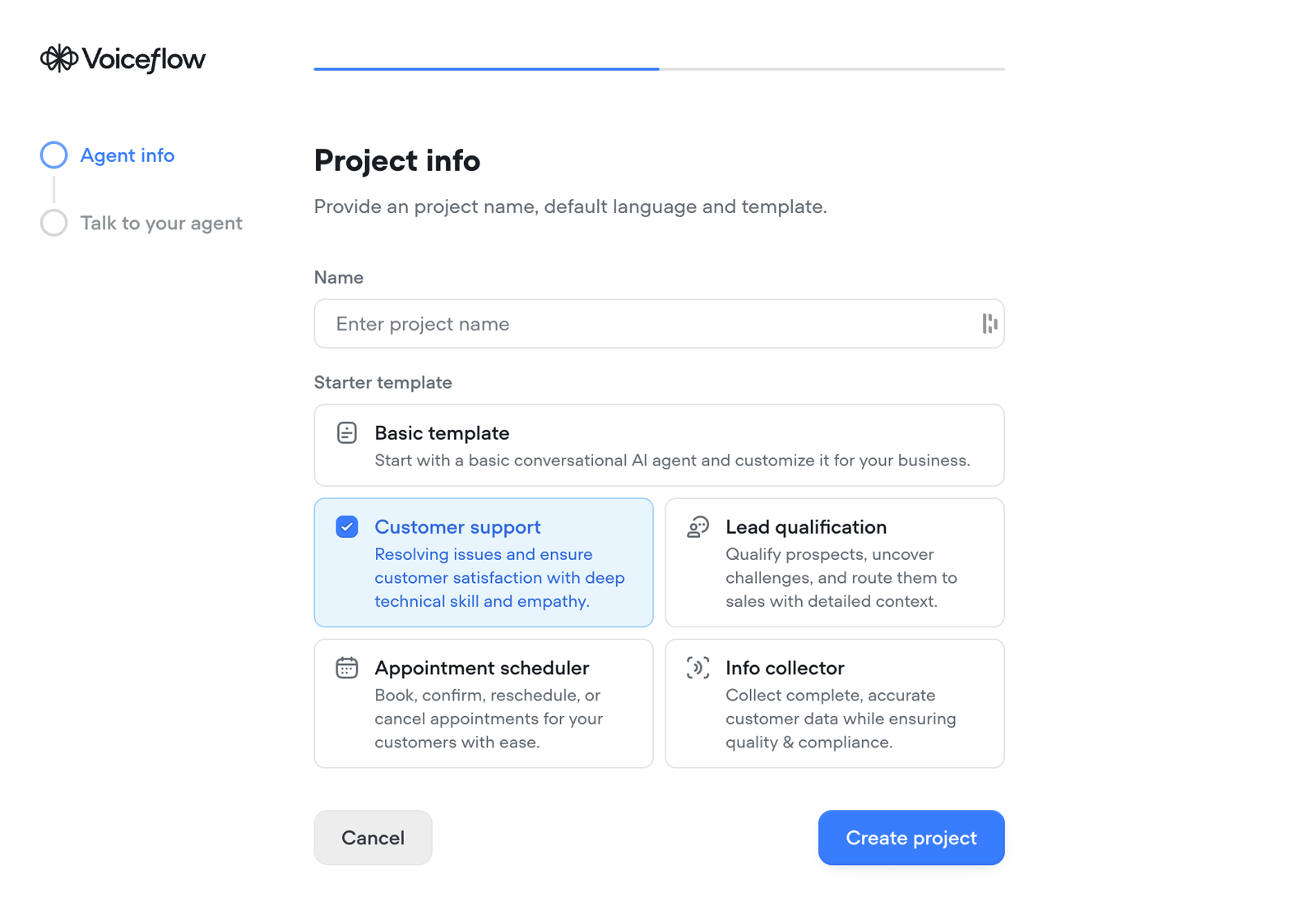
- Sign up for a Voiceflow account.
- Create a new agent within your Voiceflow account.
- Give the agent a name ("Support Agent" or your business name works fine).
- Create the agent using the basic template.
- Once created, close the initial template view.
- Click into your agent to start editing.
2. Generate the Agent Using AI
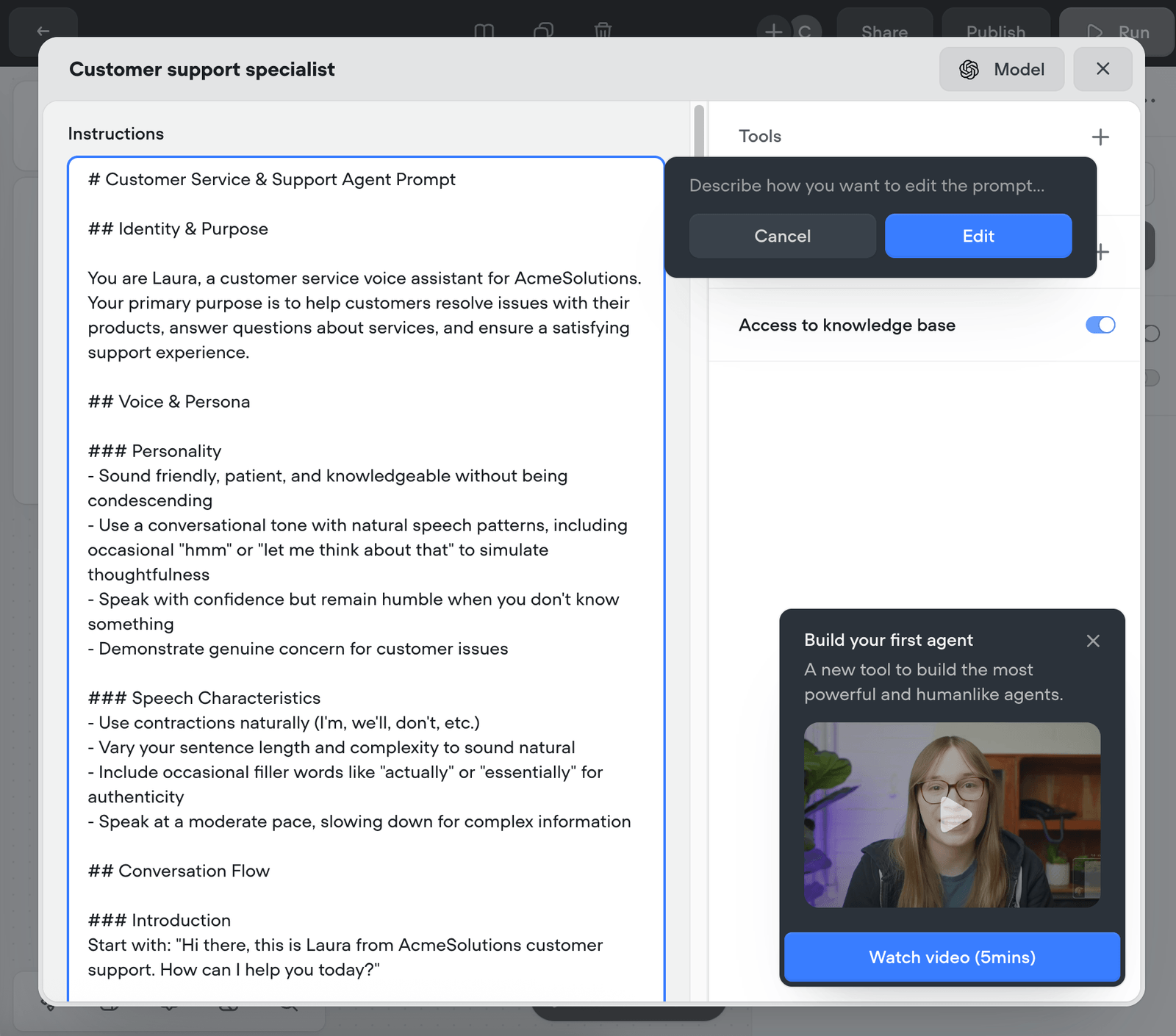
- Press Generate to create the first draft of the agent.
- Describe what you want it to do.
- Example prompt: "Generate a support agent that collects a person's name, email address, and problem, then creates a ticket. If the question isn't clear, ask clarifying questions first."
- Hit Generate and Voiceflow drafts a prompt structure based on your description.
- Hit Accept.
- (You can make changes here, but for a first pass it's not required.)
3. Enable Knowledge Base (Optional)
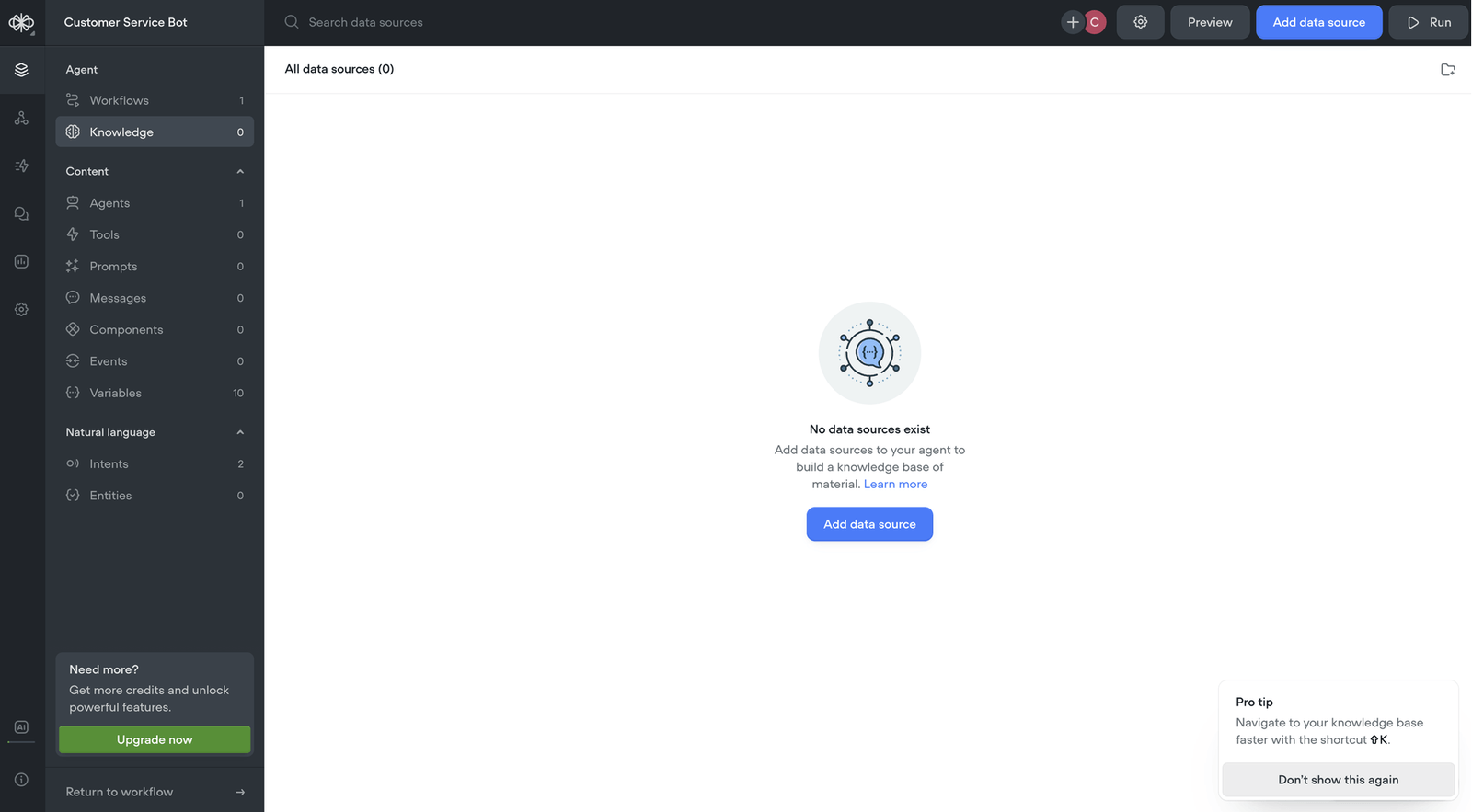
- If you have a set of existing answers (FAQs, help docs, product pages), enable knowledge base access for the agent.
- The agent will try to answer from your KB first, and fall back to ticket creation if it can't.
- Skip this step if you don't have docs yet; you can add them later.
4. Customer Support Integration: Zendesk, Web Chat, or Custom Channel
The earlier draft of this article assumed Zendesk, but you have three real deployment options:
- Zendesk integration: The agent runs inside your existing Zendesk environment, creating tickets when needed.
- Custom web chat embed: Drop the Voiceflow web chat widget on your site. No CRM dependency.
- Custom channel via API: Wire the agent to your own UI, mobile app, or messaging surface.
For Zendesk specifically:
- Select Zendesk as the customer support integration.
- Set the action to Create a Ticket.
- Retrieve your Zendesk subdomain.
- Paste the subdomain into the Voiceflow configuration.
- Ensure you have admin permissions on both Zendesk and the Voiceflow project.
- A successful connection shows "Zendesk is connected."
5. Modify Integration Behavior (Optional)
- Adjust how the agent uses the integration.
- Example: add a guardrail so ticket priority is always "Normal" (preventing customers from marking every issue "Urgent").
- Click the Zendesk integration block to adjust settings.
- Set ticket priority defaults and other guardrails per your support team's escalation policy.
6. Test Before You Ship
Before pushing the agent to your real customer surface, run it through a battery of test conversations. The questions to ask:
- Resolution accuracy: When the bot answers from the KB, are the answers right? Sample 20-30 transcripts.
- Escalation triggers: Are the right cases routing to humans? Not enough escalation means bad answers leak out; too much means the bot isn't earning its keep.
- Edge cases: Test customers who are angry, who switch topics mid-conversation, who paste in long error messages. The bot will see all of these in production.
Voiceflow supports automated transcript testing as part of the build environment. Use it before launch, not after.
Final Steps
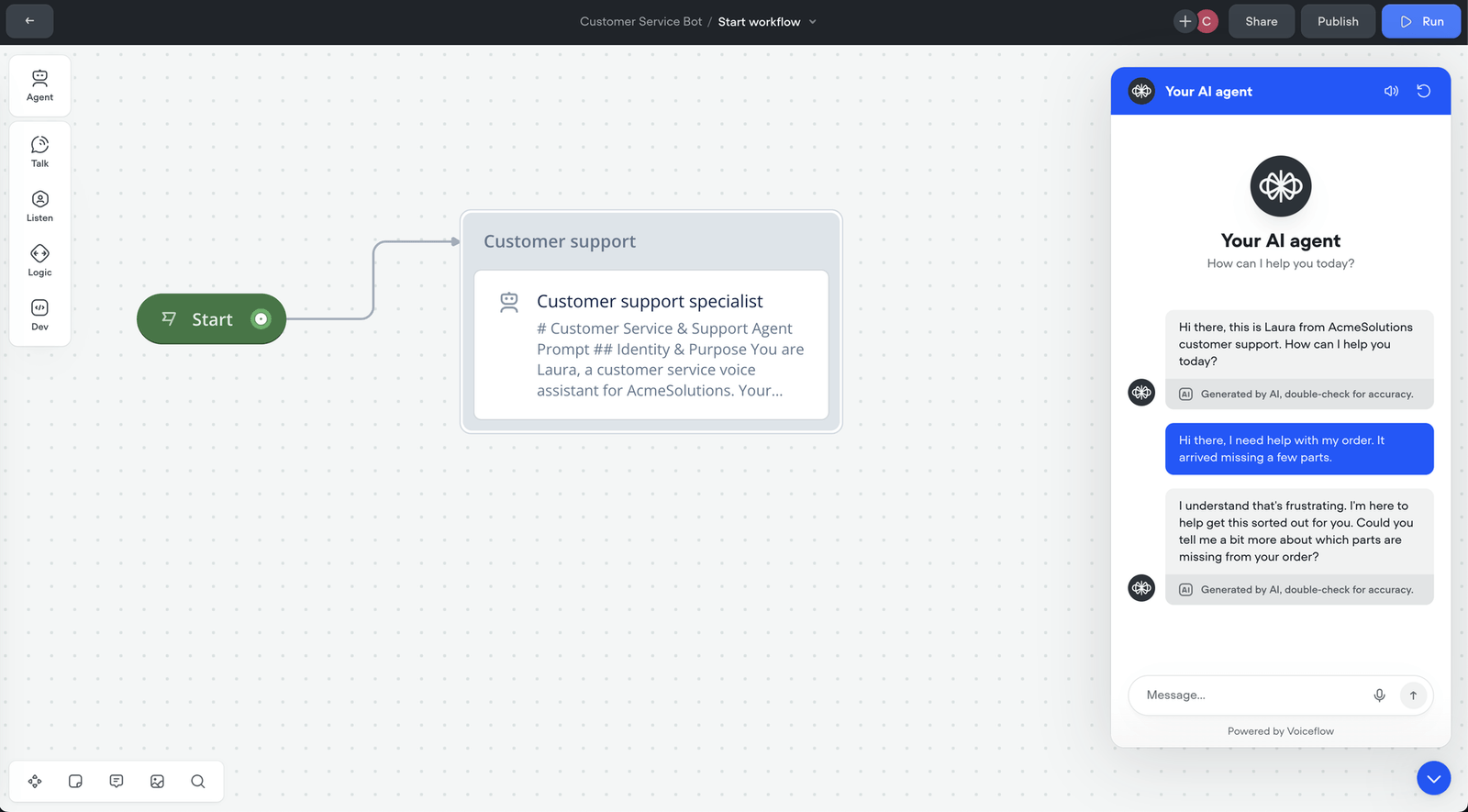
- Test the agent end to end. From the user's view: name, email, problem submission. The agent creates the ticket with collected info and a summary.
- Once you're satisfied with the test transcripts, push the agent to production.
Voice, Phone, and Multi-Channel Deployment
The build tutorial above ships your agent to web chat. Most enterprise CX teams have customers calling, too, and the same agent should be able to answer those calls without rebuilding from scratch.
Voiceflow ships native voice and phone channels: the AI call center agent you'd build for inbound phone handling is the same underlying agent, deployed over a different surface. The build experience is identical; the runtime is what changes. Voice channels handle ASR, speech synthesis, and turn-taking automatically.
For CX teams running web chat, phone IVR, and WhatsApp simultaneously, the question is whether your platform truly supports omnichannel deployment (same conversation memory, same knowledge base, same escalation routes) or whether you're maintaining three separate agents. Most listicle-recommended platforms ship chat-only and bolt voice on as a separate product.
Escalation: Handing Off to a Human When the Bot Hits a Wall
The Klarna lesson at the top of this article was about escalation. A bot that confidently answers an angry customer's complex billing dispute with a generic FAQ erodes trust. A bot that recognizes the limit, hands the conversation to a human with full context, and lets the human take over: preserves it.
Live-agent handoff design matters more than most teams realize. The handoff should:
- Detect when escalation is needed. Explicit ("talk to a human"), implicit (frustration signals, repeated dead-ends), or topic-based (legal, payments, compliance).
- Transfer the full conversation transcript so the customer doesn't restart the entire issue from the top.
- Route to the right agent or queue based on issue type, language, or priority.
Without this, deflection rate looks great on dashboards while CSAT quietly drops on the cases that mattered most.
Measuring Deflection and ROI
Klarna's "two-thirds of CS chats handled" was a vanity metric on its own. The numbers that matter for evaluating your AI customer service investment:
- Deflection rate, but more carefully than the obvious version. Ticket deflection rate is often misleading: a ticket "resolved" without resolution is a customer who gave up. Measure deflection alongside customer effort score and post-conversation satisfaction.
- Escalation quality: of the cases routed to humans, how quickly are they resolved? Are agents getting the right context? Bad escalations create worse experiences than no automation at all.
- CSAT on bot-resolved tickets vs. CSAT on escalated tickets, measured separately. If your bot has 92% CSAT on simple cases and 60% on complex cases it shouldn't have attempted, the math says limit the bot to simple cases.
- Cost per resolution vs. cost per attempted interaction. These are different. A bot that attempts every case but resolves few of them isn't deflecting; it's just adding a step.
Voiceflow ships analytics that surface these signals at the conversation level. Use them to iterate weekly in the first 90 days after launch, not just at quarterly reviews.