A voicebot used to mean a glorified phone tree. You pressed 1 for billing, said "representative" six times, and eventually gave up. That is not what people mean by the word anymore.
Today a voicebot is an AI agent you can actually talk to. It understands what you said, works out what you need, and does something about it. I build voice agents for a living, and the interesting part is not the demo. It is the gap between a voice that sounds magic on stage and an agent that holds up when a real customer calls at 11pm. This guide covers both: what a voicebot actually is in 2026, and how to build one that survives contact with real callers.
What Is a Voicebot?
A voicebot is an AI system you interact with by speaking instead of typing. Under the hood it chains a few capabilities together:
- Speech-to-text, also called automatic speech recognition, turns what the caller says into text.
- A language model reads that text, works out the intent, and decides what to do next. This is the piece that changed everything, and it leans on natural language processing to understand context rather than just keywords.
- Text-to-speech turns the response back into a natural-sounding voice. If you want the detail on how that synthesis works, we wrote it up in our text-to-speech guide.
The older way of drawing this split it into four separate boxes: speech recognition, language understanding, dialogue management, and speech synthesis. That model still describes the moving parts. The difference now is that an LLM does the reasoning in the middle, which is why modern voicebots finally sound less like a script reading itself aloud and more like a conversation.
Voicebot vs. Voice AI Agent: What Actually Changed
You will see "voicebot" and "voice AI agent" used interchangeably, and the distinction is worth understanding because it explains why the old ones were so painful to use.
A classic voicebot followed a fixed script. Say something it did not expect and it broke, looped, or dumped you back into a menu. A voice AI agent uses an LLM to reason in the moment. It can take a question out of order, pull a real answer from your knowledge base, and decide on its own when a human should take over. Same channel, completely different experience. When I say "voicebot" in this guide, I mean the modern agent-style version, because the script-reading kind is not worth building in 2026.
How a Voicebot Works, With a Real Example
Picture calling your bank to dispute a charge. You say, "I want to dispute a charge from last Tuesday." The voicebot transcribes that, the language model recognizes both the intent and the date, and it looks up your recent transactions through an API. It reads the charge back to you, and then either files the dispute or routes you to a person with the full context already attached. You never pressed a button or repeated yourself.
That is the whole point. A good voicebot collapses the menu-and-hold ritual into one short conversation. This is the same pattern behind conversational AI in general, just delivered over a phone line instead of a chat widget.
For the phone channel end to end, see our guide to AI phone calls.
Building a voicebot for support? See how enterprises deploy AI voice agents for customer support.
Where Voicebots Actually Earn Their Keep
Not every call is worth automating, and pretending otherwise is how teams end up with a voicebot everyone hates. The ones that pay off handle high-volume, repeatable calls and hand the rest to people. The strongest use cases I see:
- Customer service triage. Answering FAQs, authenticating callers, and taking routine payments. These are the repetitive calls that eat an AI call center team's day, and they are the easiest wins.
- After-hours and overflow. A virtual receptionist that answers at 11pm or during a volume spike is often the difference between a booked job and a lead that called your competitor instead.
- Appointment booking and reminders. Checking availability, booking the slot, and confirming it back, without the phone tag.
- Banking and account servicing. Balance checks, card freezes, transaction history. People are often more comfortable doing these with a bot than a stranger.
- Outbound follow-ups. Reactivating dormant leads, confirming appointments, and short surveys, all of which scale better over AI phone calls than a team of dialers.
What stays with humans: anything emotional, high-value, or genuinely ambiguous. A good voicebot knows its limits and does a clean handoff instead of trapping the caller.
What Separates a Good Voicebot From One People Hate
Here is where most projects go wrong. The demo always sounds great. Production is a different animal, and four things decide whether callers tolerate your voicebot or rage-press zero:
- Latency. Silence is brutal on a phone call. If the agent takes two seconds to respond, the caller assumes the line dropped. You are aiming for responses that come back fast enough that nobody notices the gap.
- Grounding. The agent has to answer from your real policies and data, not improvise. That means a knowledge base it retrieves from, not a clever prompt you hope covers every case.
- Graceful handoff. When it hits its limit, it should pass the call to a person with context, not start the conversation over. Get the handoff wrong and you undo every bit of goodwill the automation earned.
- Honest measurement. Deflection rate on its own will lie to you. A call the bot "handled" by frustrating someone into hanging up counts as a deflection and a failure. Watch real resolution and escalation instead, which is the argument we make in detail about what ticket deflection rate actually means.
This is also why the line between a voice chatbot and a serious contact-center agent is mostly about the unglamorous parts: retrieval, handoff, and observability, not the voice itself.
How to Build a Voicebot, the Honest Version
Skip any guide that promises a production voicebot in five minutes. You can prototype one in an afternoon. Shipping one that handles real calls takes a few rounds of testing, and that is normal. Here is the shape of the build on Voiceflow, which is the platform I work on.
Design the conversation. Use Workflows for the deterministic steps that must happen the same way every time, like verifying a caller or booking a slot. Use Playbooks for the open-ended turns where you give the agent a goal and let it reason.
Connect a phone number. Wire the agent to a telephony provider like Twilio, and pick your speech-to-text and text-to-speech providers. Voiceflow is model-agnostic, so you choose the LLM (OpenAI, Anthropic, Google) and swap it as cost and quality shift.
Ground it in a knowledge base. Upload your policies, pricing, and FAQs so the agent answers from your real content instead of guessing.
Set the handoff rule. Decide what triggers a transfer to a human, and forward the call with the conversation history attached.
Test with real calls, then watch it. Run Evaluations before launch, ship through separate dev and production Environments, and use Observability to see what the agent actually said on live calls. That last step is where the real tuning happens.
For regulated or sensitive calls, Voiceflow runs with SOC 2 Type 2 compliance and PII masking, which matters once you are handling account details over the phone. Teams like Turo, StubHub International, Sanlam Studios, and Trilogy build their agents this way rather than stitching the stack together from scratch.
Voicebot vs. Chatbot vs. IVR
People mix these three up constantly, so here is the short version of when each fits.
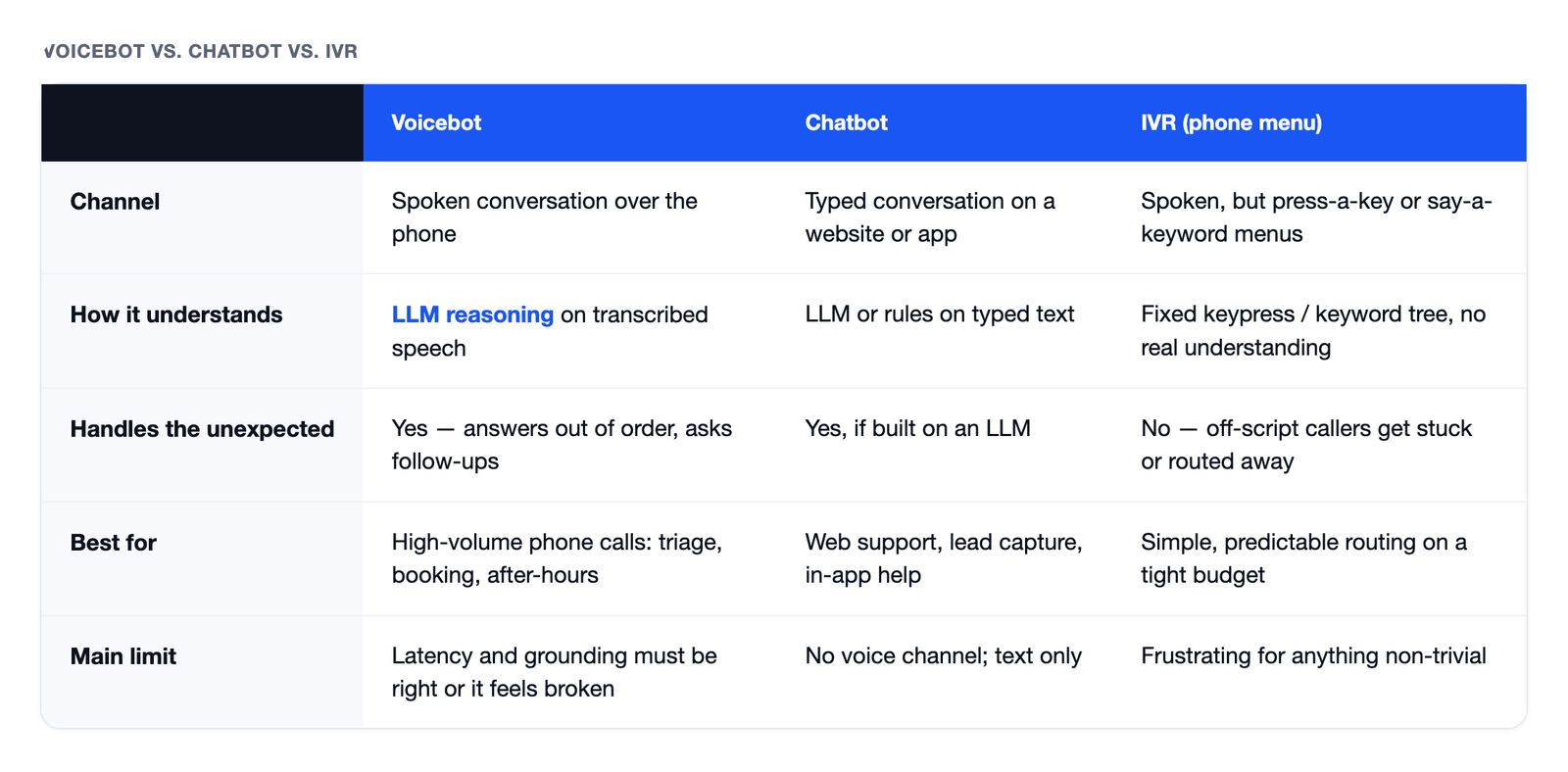
A traditional IVR is the press-1-for-billing menu: cheap, predictable, and frustrating for anything non-trivial. A chatbot handles text on your website or app. A voicebot handles spoken conversation over the phone with the reasoning of an LLM behind it. Most contact centers end up running more than one, which is why contact-center automation is usually a mix rather than a single tool, and why agentic AI in the contact center increasingly means replacing rigid menus with an AI IVR that lets callers just say what they want.